


eKYC

Updated on 02.09.26

5 minutes to read

Copy link
Overview
eKYC (Electronic Know Your Customer) confirms a user's identity in real time by matching their submitted name, date of birth and national ID number against government registries, credit bureaus and telco records. It replaces manual document review with an instant match or no-match result. Every check is enriched with SEON's 1100+ fraud signals so you get a compliance record and a risk signal from the same call.
How eKYC works
eKYC runs as a real-time lookup against an official data source rather than an analysis of an uploaded document.
- Data collection. Your application collects the user's personal information — full name, date of birth and the relevant national ID number (for example, SSN, CPF or BVN).
- Request submission. SEON securely submits that data to the official source for the selected country and ID type.
- Source verification. The source attempts to match the submitted data against its own records.
- Result delivery. SEON returns a standardized result value in the API response and, if configured, via webhook.
Prerequisites
The user's identity data for a supported country and check type —required fields, such as name, date of birth and identifier, vary by check.
Supported countries and checks
SEON's eKYC coverage spans a broad and growing set of countries, with each country supporting one or more check types tied to a specific national identifier. For the current list of supported countries, check types and required fields, see the full list of eKYC checks.
If you don't see the country or check type you need, contact your account manager to confirm coverage or request access.
How to run an eKYC check in a Workflow
If you don't want to write branching logic in your own backend, build the check inside Workflows, SEON's drag-and-drop verification builder in the Admin Panel.
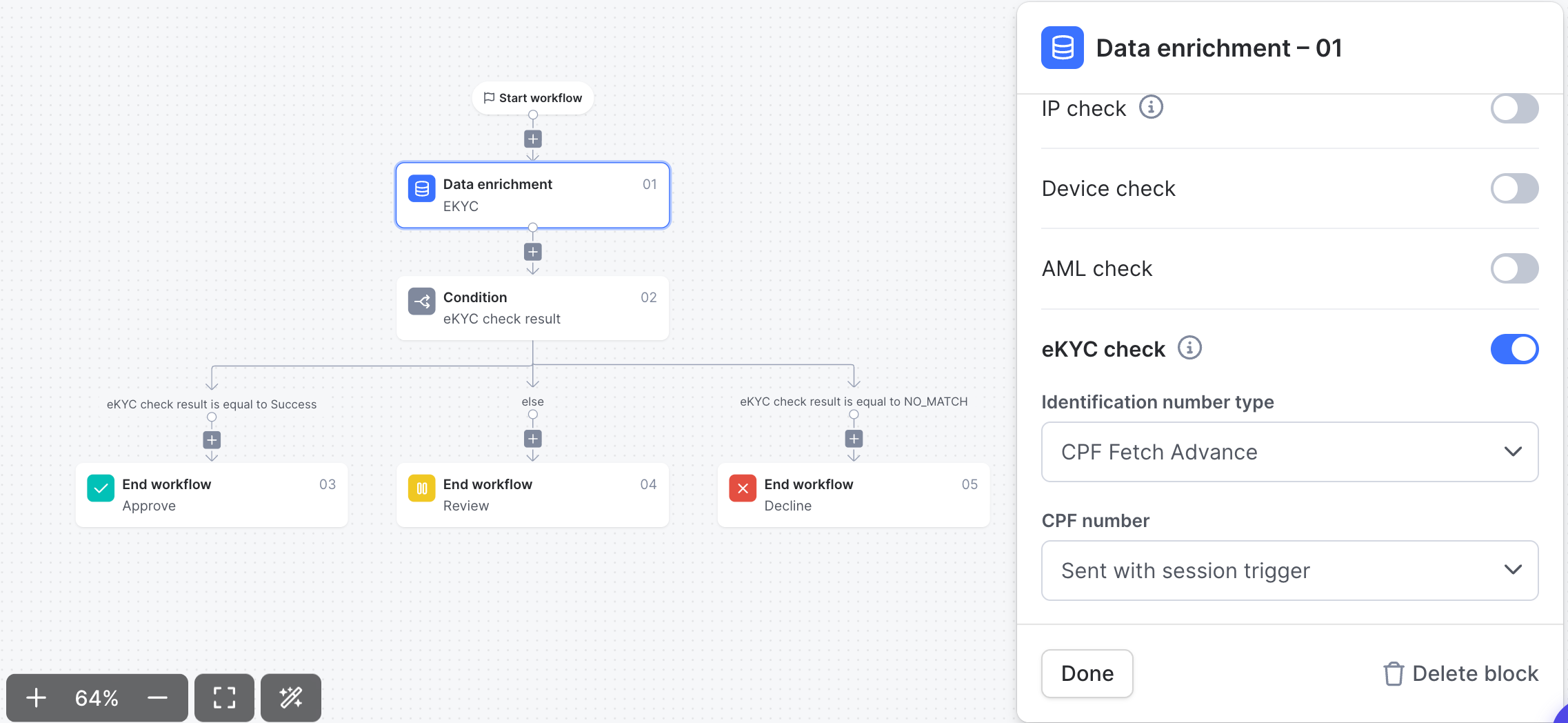
- Add a Data enrichment block to your workflow and toggle on eKYC check.
- Choose the Identification number type (for example, CPF Fetch Advance for
BR_ID_CPF_EXT) - Map the required fields to values from your session trigger.
- Add a Condition block that branches on the eKYC check result.
- Add an End workflow block for each outcome — for example, route
Successto Approve,NO_MATCHto Decline, and everything else to Review.
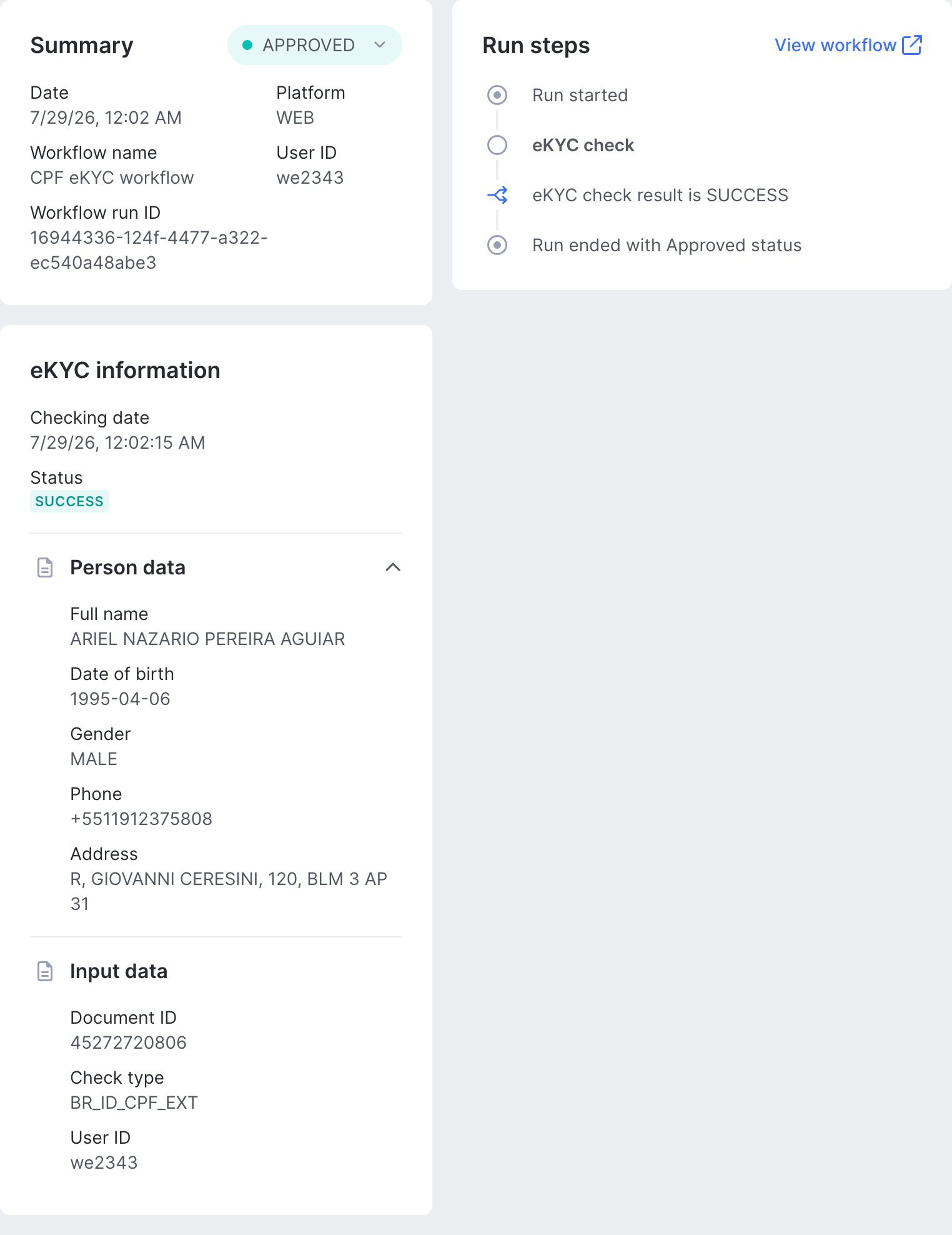
Each run appears in Transactions | Workflow runs with the full decision trail. In this run, a CPF Fetch Advance check (BR_ID_CPF_EXT) returned SUCCESS, the condition routed it to Approve, and the returned person data — name, date of birth, gender, phone, address — is visible directly in the run detail alongside the run steps.
How to run an eKYC check via the API
- Add an
ekycobject to theconfigblock of your Fraud API request, settingtypeto the check code for the applicable country (for example,BR_ID_CPF). - Set
ekyc_apitotrueto trigger the check. - Set
response_fieldstoekyc_data,ekyc_resultto receive both the match result and the underlying person data (useekyc_resultalone if you only need the status). - Include the fields the check requires — see the supported countries and checks reference for the exact fields per check.
- Read
ekyc_resultfrom the response to branch your logic.
Example: verifying a Brazilian CPF
Request:
{
  "config": {
    "ekyc": {
      "timeout": 3000,
      "type": "BR_ID_CPF"
    },
    "ekyc_api": true,
    "response_fields": "ekyc_data,ekyc_result"
  },
  "user_id": "usr_1234567890",
  "id_value": "43335747810",
  "user_country": "BR"
}
Response:
{
  "ekyc_result": "SUCCESS",
  "ekyc_data": {
    "person": {
      "fullName": "Kleyson Pinheiro",
      "dateOfBirth": "1985-12-31",
      "nationalIds": [
        { "type": "CPF", "value": "43335747810", "country": "BR" }
      ]
    },
    "additionalData": {
      "registrationStatus": "Regular",
      "isDeceased": false
    }
  }
}
Result values
| Value | Definition |
|---|---|
SUCCESS | The source returned a result (for ID-only checks), or all provided parameters matched. |
PARTIAL_SUCCESS | The source returned a result, but not all provided parameters matched. |
REVIEW | The source returned an inconclusive verdict — the data falls into a gray area, requires manual review, or triggered non-critical warnings. |
NO_MATCH | The source ran the search successfully but found no record for the core identity data. |
FAILED | The source explicitly returned a negative verdict — the identity data contradicted its records, or severe negative signals were detected. |
FAILED_PROCESSING | The source could not complete the check due to a technical error, outage, or invalid input. |
Best practices
- Timeouts never fail the whole request. If the eKYC source times out or errors, SEON returns 200 OK for the overall Fraud API call and simply omits the ekyc_result and ekyc_data fields rather than failing the request. Check for their presence in your response handling instead of relying on HTTP status.
- Partial data reduces match rates. Always send full name and date of birth before sending the ID number — checks run against incomplete data are more likely to return NO_MATCH or PARTIAL_SUCCESS.
- Sanitize the ID value. Strip special characters, dashes and spaces from the ID number before submitting it, and validate the format against the country's requirements (see the reference table above).
- Field availability varies by check. Not every check returns full person data — some sources only return match flags. Confirm the exact response shape for your check type in the eKYC endpoint reference.
Use cases
- Instant customer onboarding: Onboard users in seconds by instantly verifying their identity against government records, creating a frictionless and secure sign-up experience.
- Financial services compliance: Meet stringent KYC and AML requirements for opening bank accounts, crypto wallets or other financial products by using official database checks.
- High-assurance identity proofing: Use eKYC as a high-assurance verification step for users in supported countries, providing the strongest level of identity confirmation.
- Data pre-fill and error correction: Use the data returned from a successful eKYC check to automatically pre-fill or correct user information in your system, ensuring data accuracy.
FAQ
- What is eKYC verification? eKYC (Electronic Know Your Customer) is an automated check that confirms a user's identity by matching their submitted name, date of birth and ID number against a government, credit bureau or telco record, returning a result in real time.
- How is eKYC different from document verification? Document verification checks a physical or scanned ID document for authenticity. eKYC skips the document entirely and checks the user's submitted data directly against an official record, which makes it faster but depends on the source's coverage in a given country.
- Can I use eKYC without writing code? Yes. Add a Data enrichment block to a Workflow and toggle on the eKYC check, then combine it with document checks, selfie verification or AML screening — all without a separate API integration.