


Document verification

Updated on 02.09.26

8 minutes to read

Copy link
Overview
The document verification check uses AI-powered, template-free document analysis to authenticate government issued identity documents across formats, versions and issuers in real-time. It confirms that an ID document is genuine and has not been tampered with, forming a critical first step in building trust with your users.
This check is designed to prevent fraud by validating the authenticity of physical documents, such as passports, driver’s licenses and national IDs. By analyzing dozens of data points, from security features to data consistency alongside 1100+ unique fraud signals that span across digital footprint, device intelligence, behavioral biometrics and IP reputation, with the help of the AI document decisioning agent SEON can quickly determine legitimacy, fraud risk and user intent while optimizing acceptance rates.
Supported documents and file requirements
- Supported document types: SEON supports over 10,000 document types across 200+ countries, including passports, national IDs, driver’s licenses and residence permits.
- File requirements: The platform accepts JPEG, PNG and PDF file formats for document uploads. The maximum file size is 16 MB.
How it works
The document verification process is a streamlined, user-friendly flow that guides the user through capturing their ID and delivers a result in seconds.
- Country and document selection: The user selects the issuing country and type of document they wish to use. In many cases, the document type is automatically detected.
- Guided document capture: The SEON SDK provides a camera-guided interface to help the user capture clear images of both the front and back of their identity document.
- User intent analysis: The captured images are sent to SEON’s servers for document analysis. In parallel, SEON’s fraud engine gathers hundreds of data points — including device intelligence, IP data and digital footprint information — to analyze the context of the verification. This holistic approach allows the system to move beyond simple document validation and assess the true intent behind the verification attempt.
- Unified verification results: Unified verification results are produced by an AI document decisioning agent, returning pass, fail or review outcomes with a detailed breakdown of all document and fraud signals. This unified outcome, enriched with fraud scores and signals about user intent, is delivered via webhook and is available in SEON.
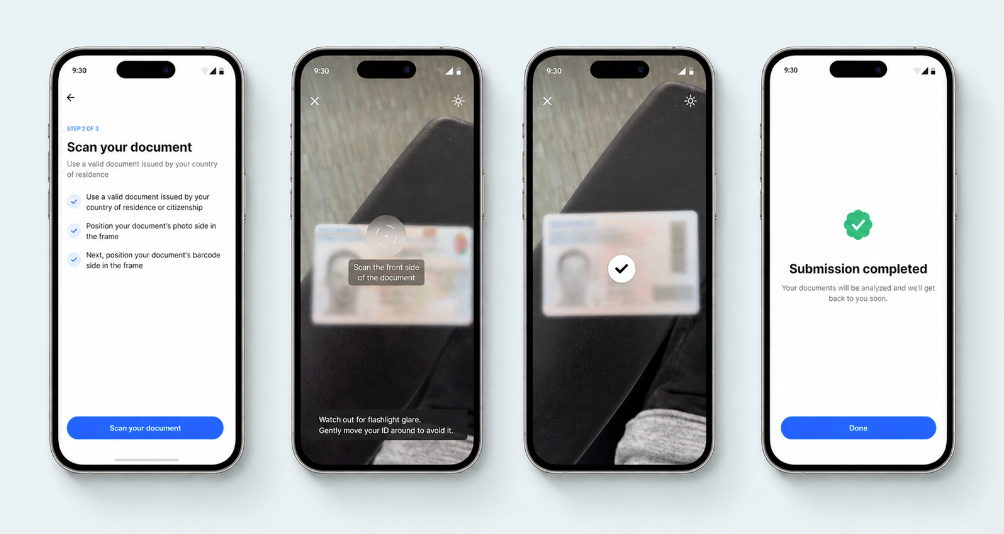
Document verification checks
SEON performs a comprehensive, template-free AI analysis to ensure the integrity and authenticity of every submitted document. These checks are designed to detect a wide range of fraud techniques, from simple forgeries to sophisticated digital tampering. Organizations have the ability to fine-tune the sensitivity of each check according to their specific requirements with the help of SEON’s team.
| Check | What it validates |
| Image quality | Ensures the image is not blurry, glaring or low-resolution, meeting minimum thresholds for analysis. |
| Information consistency | Verifies that repeated fields on the document, such as name or date of birth, match each other. |
| Data logic | Checks for logical coherence, such as ensuring the document’s issue date comes before its expiry date. |
| Field format | Confirms that data fields conform to the expected format for the specific document type and country. |
| Barcode authenticity | Matches the data printed on the document with the information encoded in its barcode. |
| Suspicious data | Detects the use of placeholder or sample text in critical data fields. |
| Data integrity | Ensures all required fields are present and readable, with no missing information. |
| Screen detection | Identifies screen based document fraud using AI signals that recognize display artifacts rather than static image rules. |
| Photocopy detection | IIdentifies photocopied documents using AI driven texture, depth and print artifact analysis. |
| Photo forgery | Detects portrait photo manipulation, swaps, and edits using AI based visual, biometric and contextual consistency analysis. |
| Security features | Validates holograms, watermarks and other security features using AI models that adapt to document versions, issuers, and regional variations. |
| MRZ validity | Confirms that the machine-readable zone (MRZ) data is valid and matches the information printed on the document. |
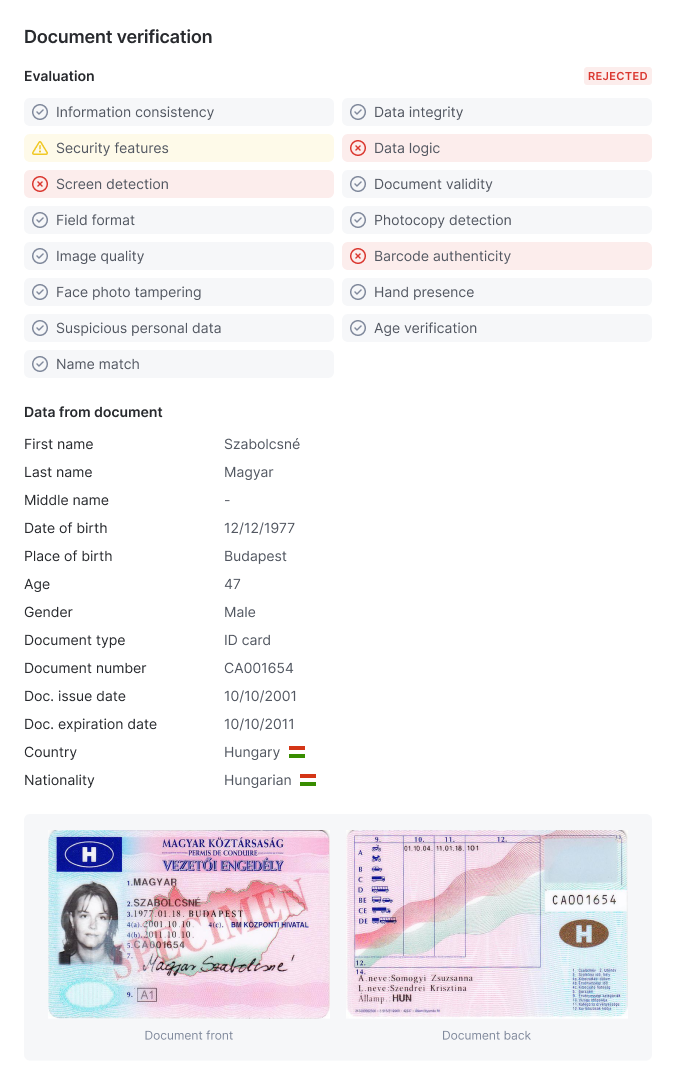
OCR data extraction
As part of the verification process, SEON automatically extracts structured data using template free OCR driven by AI document understanding models, removing dependency on fixed field layouts. This eliminates manual data entry while remaining resilient to layout changes, language differences, and issuer updates.
Extracted data includes:
- Full name, date of birth, gender and nationality
- Document number, issue date and expiry date
- Address (where present)
- Issuing country and authority
Document capture guidance
The SEON SDK provides real-time guidance to help users capture high-quality document images. During the capture process, users receive contextual prompts based on what the system detects:
Quality and positioning guidance
| Guidance message | When it appears |
| "Keep document and phone still" | Blur detected in the image |
| "Keep document parallel to phone" | Camera angle is too steep |
| "Move the document from the edge" | Document is too close to the frame edge |
| “Keep face photo fully visible” | The portrait on the ID is partially obscured |
| “Move closer” | Document is too far from the camera |
| “Move further” | Document is too close to the camera |
| "Tilt or move document to remove reflection" | Glare detected on the document surface |
| "Keep the document fully visible" | Part of the document is occluded or cut off |
| "Move to brighter spot" | Lighting is too dark for clear capture |
| "Move to spot with less lighting" | Lighting is too bright, causing overexposure |
Document side and page guidance
| Guidance message | When it appears |
| "Flip the document" | User needs to flip to capture the other side |
| "Flip to the back side" | Back side capture is required |
| "Scan the front side of the document" | Front side needs to be captured |
| "Scan the back side of the document" | Back side needs to be captured |
| "Scan the data page of the document" | For passports or multi-page documents |
| "Scan the left page" | Left page needs to be captured |
| "Scan the right page" | Right page needs to be captured |
| "Scan the top page" | Top page needs to be captured |
| "Move to the page on the left" | User is on wrong page, needs to move left |
| "Move to the page on the right" | User is on wrong page, needs to move right |
| "Move to the page on top" | User is on wrong page, needs to move up |
| "Move to the left page" | Navigate to the left page |
| "Move to the right page" | Navigate to the right page |
| "Move to the top page" | Navigate to the top page |
Barcode scanning guidance
| Guidance message | When it appears |
| "Scan the barcode" | Barcode capture is required |
| "Scan barcode from the last page" | For documents with barcodes on the final page |
Document validation guidance
| Guidance message | When it appears |
| "Document not accepted" | The document type is not supported |
| "Try scanning a different document" | User should provide an alternative document |
| "Document not recognized" | The system cannot identify the document type |
| "Scan the front side of a supported document" | User should capture a valid document's front side |
Document upload
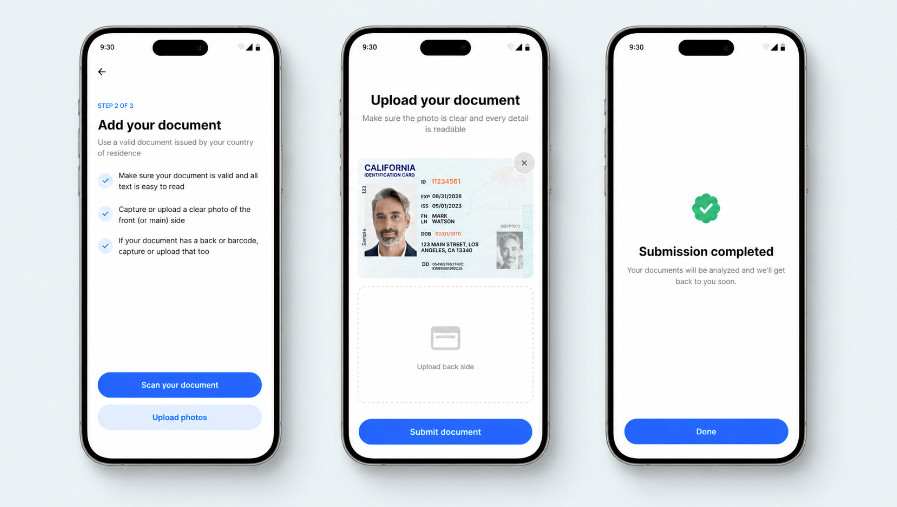
By default, document verification captures documents using a camera. When document upload is enabled for a workflow, users can submit photos of their identity document from their device’s file system, which is useful for web flows where camera access is restricted, or where users prefer to upload an existing image.
Document upload is an optional setting on the Document verification node when creating a workflow. When disabled, the camera capture experience is unchanged.
How ID document upload works
- Upload prompt: Once the user starts the identity verification session and starts ID document verification, the user can choose between taking a picture (camera capture) and uploading a picture of their ID. If document upload is disabled for the workflow, only camera capture is available.
- File selection: The user selects one or two files depending on the document type. Passports require a single image (data page only); all other document types (national ID cards, driving licences, residence permits) require two images to show the front and back. Country-specific exceptions apply where a document type is single-sided by design (for example, GB driving licences).
- Client-side validation: Before upload, the SEON validates the selected files on-device: accepted formats are JPG, JPEG and PNG and all files must be under 30 MB. Files that fail validation are rejected with an in-flow error. Within the identity verification user experice, the user will see a preview screen so they can confirm or replace the images before submitting.
- Secure upload: SEON uploads and validates files to secure storage via presigned URLs. The capture method, CAPTURE (camera) or UPLOAD (file), is recorded on the document check record and is available in the workflow runs session result.
- Verification: Uploaded images pass through the same optical verification pipeline as camera-captured images. All standard document checks (authenticity, data extraction, expiry, face matching) apply regardless of capture method.

Session video recording
When video recording is enabled on a workflow, SEON captures a video of the user’s ID document check session. The recording covers the full ID document capture step, from the moment the camera is active until the user completes the capture, and is stored securely alongside the session result. Reviewers can play back the recording directly from the session details view in the admin panel.
Video recording supports compliance requirements that mandate a recorded visual sequence of the identity proofing interaction, such as ETSI TS 119 461 (VAL-8.3.3-04X).
How to turn on session video recording
Session video recording is an optional setting that is disabled by default. It must be explicitly enabled in the workflow within the Document verification node in the Workflow Editor.
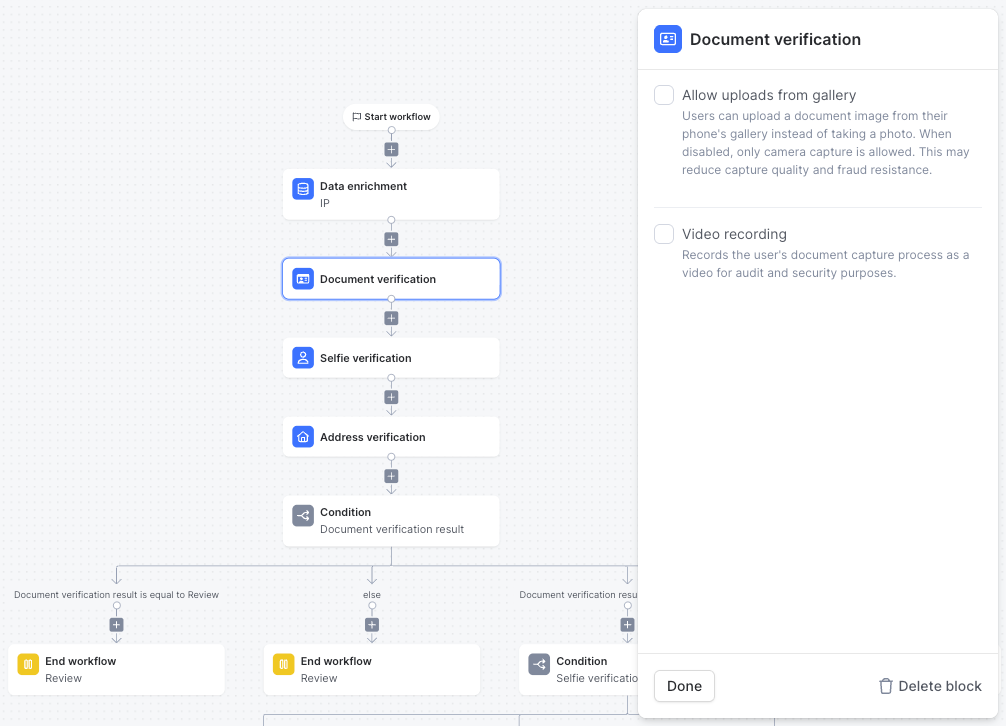
How session video recording works
- Recording starts: When the user enters the ID document capture step, the SDK begins recording automatically. No additional action is required from the user.
- Capture guidance: The guided document capture experience runs as normal. The recording captures the full interaction in the background, requiring no additional action from the user and the recording includes any re-attempts within the same session step.
- Upload and storage: Once the document capture step completes, the SDK uploads the recording to secure storage. The video is linked to the session record and is not accessible outside the workflow runs session in the SEON UI.
SEON UI access:
The recording is available in the session details view under the Document verification panel. Reviewers can play it back when assessing a session flagged for manual review.
Audio Recording
In addition to video, the Document verification node supports capturing audio during the document capture step. Under the node's Video recording settings, an Audio recording option controls how the SDK requests microphone access:
- Disabled — no audio is captured.
- Optional — the SDK requests microphone permission, but the user can continue even if they decline.
- Required — the user must grant microphone permission before continuing.
Audio recording currently applies to the document capture step only; audio capture during selfie verification is not yet supported.
Document verification use cases
- Customer onboarding: Verify the identity of new users at sign-up to comply with KYC regulations and prevent fraudulent accounts from being created.
- Age verification: Confirm that users meet minimum age requirements for access to age-restricted products or services.
- High-value transactions: Require users to re-verify their identity before executing high-risk actions, such as large fund transfers or changing account ownership.
SDK integration
Document verification is initiated and managed through SEON’s mobile and web SDKs. The SDKs provide the complete user interface for guiding users through the document capture process, ensuring high-quality images and a frictionless experience.
To start a verification, your application will initialize the SEON SDK and configure it for a document verification session. The SDK handles the camera interface, user guidance and secure submission of images to SEON’s servers.
