


Network detection

Updated on 03.04.26

12 minutes to read

Copy link
Overview
Network detection helps analysts uncover fraud and money laundering rings or networks. It identifies hidden relationships among users by continuously analyzing transaction data and revealing suspicious groups that might otherwise go unnoticed.
This allows your team to move from a reactive to a proactive stance, identifying emerging threats and mitigating risk before significant losses occur. Analysts can explore and take action on connected suspicious customers and their transactions. The goal is to detect and disrupt coordinated malicious activities proactively that are difficult to capture with traditional investigation workflows.
Network detection completes SEON’s network analysis toolset
The Network analysis tab is available on every customer, transaction or alert page. It contains three tools designed to explore and rank connections, including Graph, Data explorer and Similarity ranking. These features allow analysts to look for connections involving a single identified suspicious user. The Clone search tab under the Manual Lookup page helps analysts identify linked users within a list of suspicious user IDs.
All these are powerful reactive investigation tools in the hands of an analyst who has already detected traces of malicious activity. The essential novelty of network detection is its proactive nature: it automatically identifies suspicious groups that require investigation.
How it works
When network detection identifies a new network, it triggers a notification and lists it on the Monitoring page in order of investigation priority. The frequency of new networks detected depends on traffic volume and the fraud and risk patterns your business faces. Because the analysis runs continuously, SEON can detect bursts of malicious activity as they happen.
Network detection is particularly valuable for identifying suspicious activity that has evaded existing rules and AI scores, including approved transactions that are part of coordinated rings. The patterns discovered through network analysis form a feedback loop, enabling your team to strengthen rule sets and improve labeling, thereby enhancing your reactive defenses over time.
Before you start
Calling the Fraud API is a hard prerequisite for using network detection. This feature is available for teams that use SEON’s UI for investigations and the integrated Fraud API. To manage expectations and ensure the system surfaces meaningful coordinated activity, network detection specifically requires and processes transactions that meet certain eligibility criteria.
To gain the most value from this feature, the Fraud API traffic should include:
- Transactions with a monetary value (where the transaction amount is not zero)
- Transactions where email or phone data enrichment is requested (indicating a rich digital footprint)
- Transactions that receive a DECLINE state
- Transactions with an APPROVE or REVIEW state that exhibit a high degree of similarity to a significant number of other transactions
How to use it
Once enabled, network detection continuously processes transaction data through three main steps to identify hidden relationships and patterns.
- Transaction selection: SEON filters incoming traffic to select only high-risk, eligible transactions for analysis (as outlined in the prerequisites above). This ensures that the most relevant data — such as transactions with monetary value, rich digital footprints or suspicious similarity patterns — is used for network grouping.
- Similarity analysis: The system analyzes the selected transactions across multiple dimensions to identify broad similarities, including IP and phone number information, temporal patterns (timing of activities), geolocation and textual characteristics of key data fields. This scalable method allows SEON to identify suspiciously related groups without falsely linking legitimate customers who may exhibit similar behaviors.
- Network grouping and prioritization: A sophisticated algorithm continuously runs on the processed data, using exact field-matching to group transactions and customers into networks. Fields that are strong indicators of coordinated activity — such as email address, phone number, card hash, device identifiers and cookie hash — are weighted more heavily in this process. Each detected network is then assigned a network strength category to help analysts prioritize the investigations.
The algorithm takes into account the most critical fraud and risk signals derived from SEON’s unique proprietary data, including:
- Email address information
- Phone number information
- Device intelligence signals
- IP information
- Credit card information
- Temporal information (e.g. timing of activities)
- Geolocation information (e.g. addresses)
False positive protection
To ensure the accuracy of detected networks, SEON includes built-in protection against data quality issues that could bias the results. If a specific data value is overly common across transactions — such as a generic placeholder or a shared infrastructure identifier — the system automatically excludes these highly frequent values from the matching process. This prevents the formation of false-alert networks based on coincidental or generic data points, focusing the analysis on genuine indicators of coordinated activity.
Network detections run automatically and continuously in the background, processing the last 2 months of customer data. The system is designed to handle bursts of data effectively, ensuring that emerging networks are surfaced promptly. A transaction is typically processed and ready for network detection within 2 hours of being received.
Configuring network detection settings
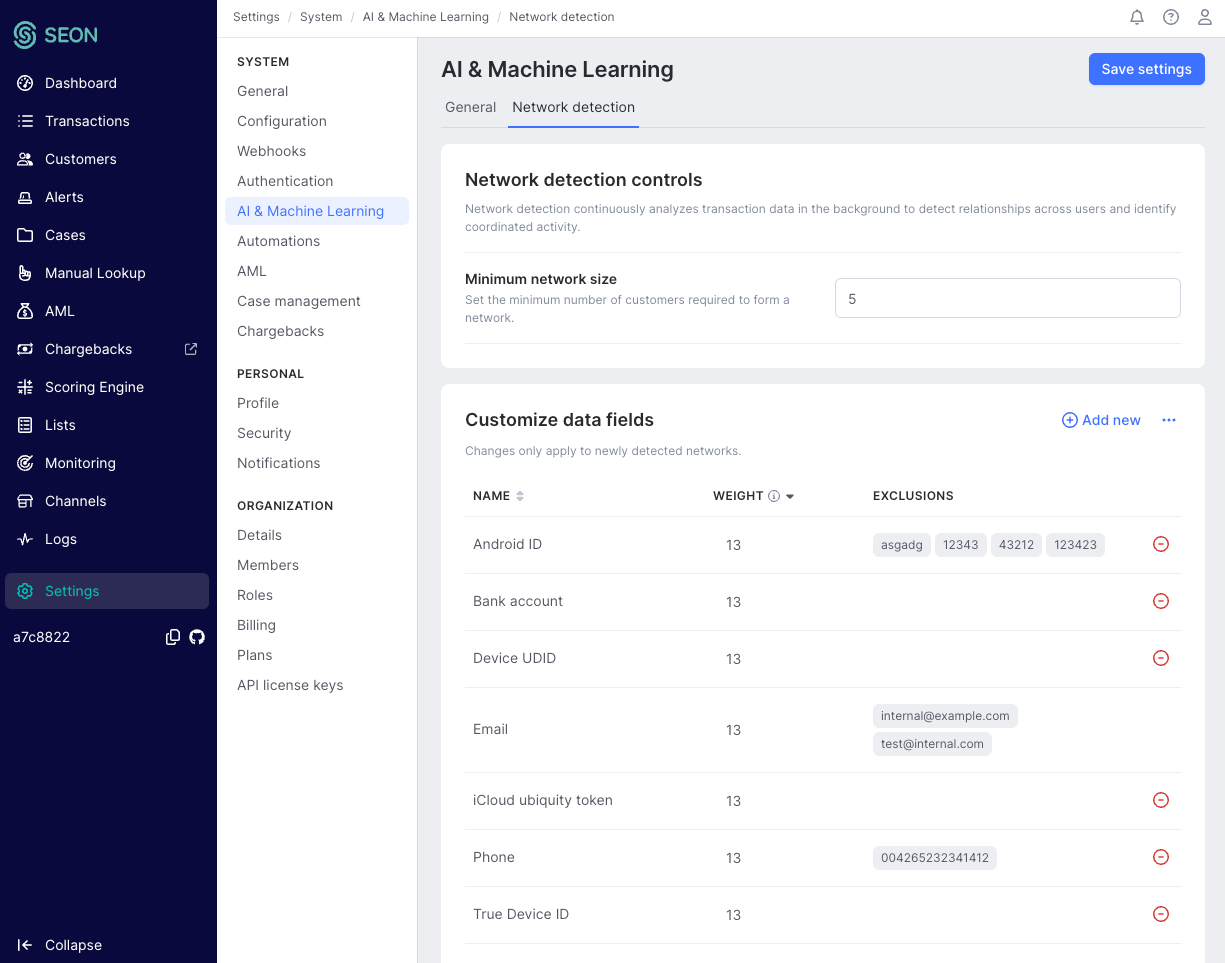
Administrators can tailor the detection algorithm to their specific business needs under Settings -> AI & Machine Learning. This allows teams to fine-tune how networks are identified and prioritized. Changes to these settings apply only to newly detected networks and do not retroactively alter previously identified groups.
Configurable parameters include:
- Network grouping fields: Select which data fields are used to connect transactions. You can choose from a curated list of relevant fields (minimum 5, maximum 50 fields).
- Field weights: Assign importance weights to the selected fields on a scale of 13, 8, 5, 3, 2, 1. Fields with higher weights contribute more significantly to the network’s strength score.
- Value exclusions: Exclude specific values from matching on a per-field basis (for example, ignoring a known test email address or a shared company IP address).
- Minimum network size: Adjust the minimum number of customers required for a network to be surfaced. The default is 5 customers. The higher this number is, the larger the networks detected will be.
How to interpret network strength
Each network is assigned a strength category based on how strongly its members are connected and how clearly the connecting data points indicate risk. This allows analysts to prioritize their work on networks that pose greater risk.
| Network strength | Description |
| High | Indicates that members are highly connected by important data fields, suggesting a strong likelihood of coordinated malicious activity. |
| Medium | Members are connected by a combination of important but less critical data points, and this connectivity is not outstanding. These networks warrant investigation. |
| Low | Connections are based on lower-weighted data points in a less tight network, which may indicate suspicious activity but could also be coincidental or legitimate activity. |
The SEON UI displays these networks as groups of customers linked by the data fields. This enables the investigation and interpretation of their connections on a graph while the customers and their transactions are listed.
Notifications
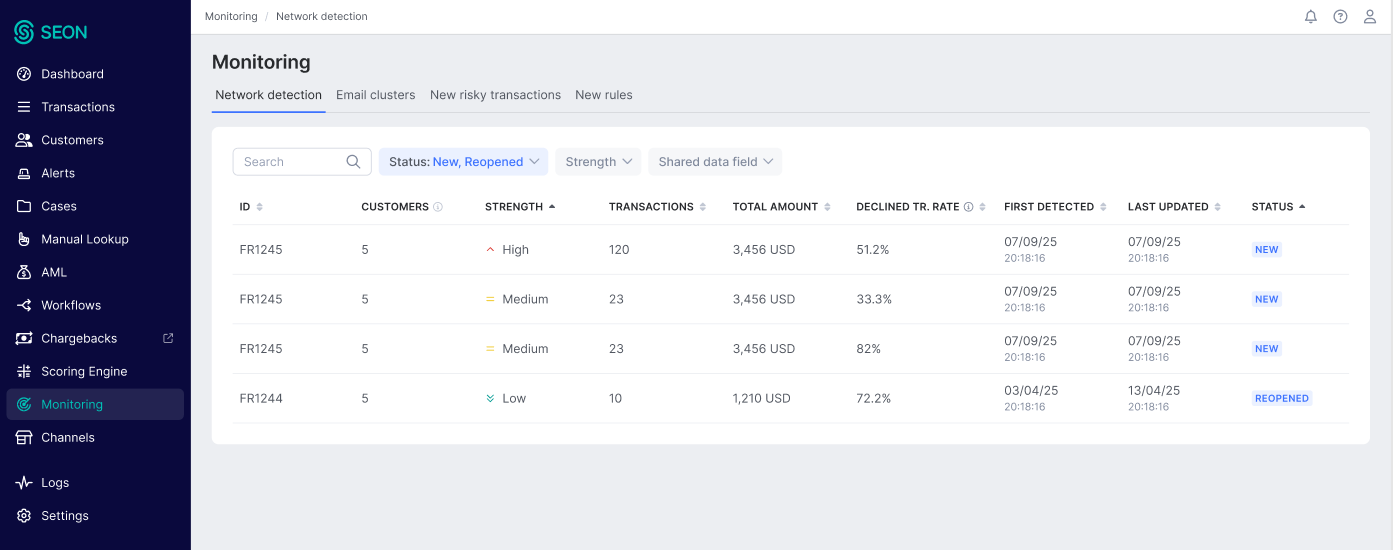
Configure notifications in Settings -> Personal: Notifications -> AI updates and suggestions, and by setting preferences for New customer network and Customer network update. Enable notifications here to get the most out of network detection’s proactive power. When a network is detected, notifications can be sent in the SEON UI (In-App) and in email (daily or weekly digest messages).
How to investigate networks
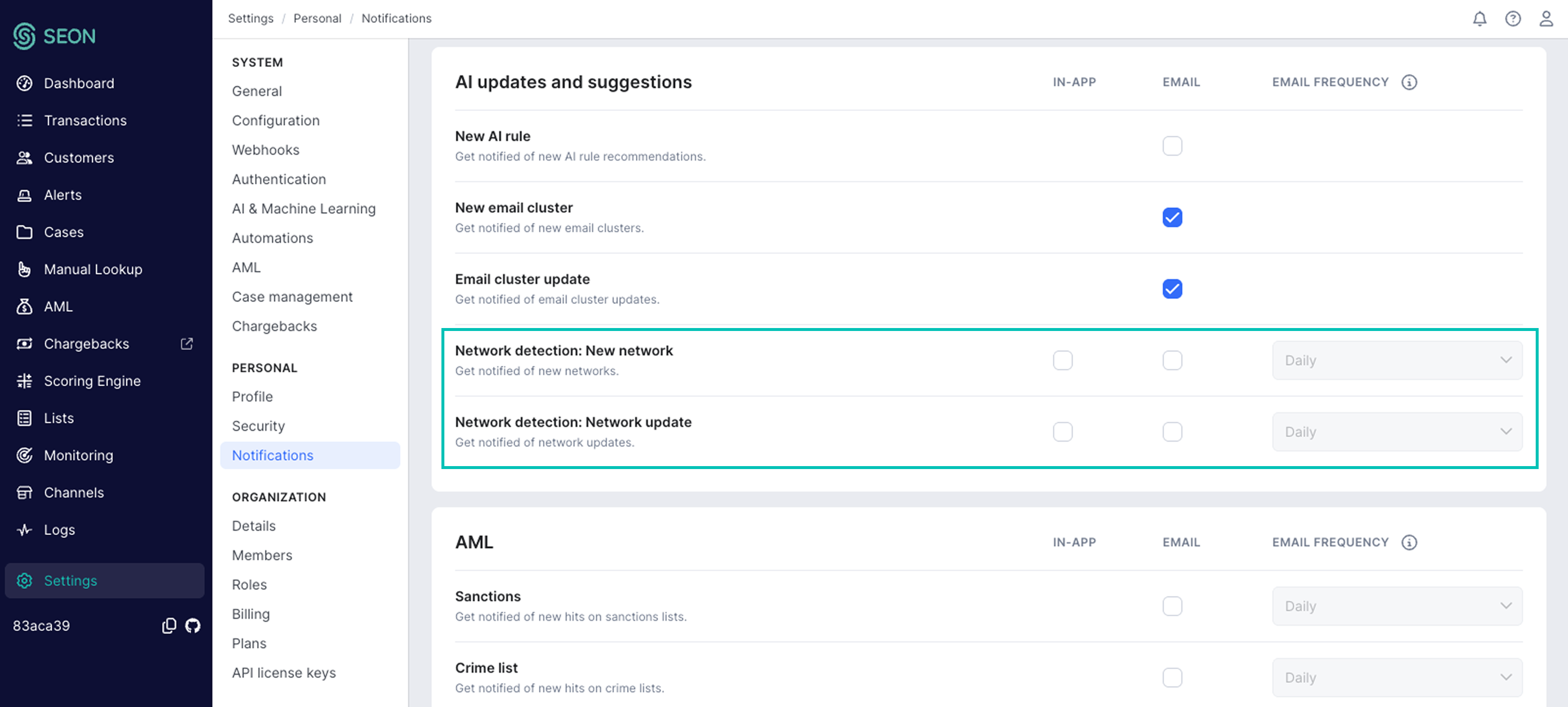
The networks can be found in the Monitoring page under the Network detection tab, which serves as the central hub for investigating suspicious networks.
Customer network list
By default, the list shows open networks in order of their last update time. From this list, you can:
- Filter by network strength, shared data field and status
- Sort by column names, including the declined transaction percentage, to identify the most urgent, highly suspicious networks to investigate
- Search for specific networks using the search functionality (see the Searching and filtering networks section below)
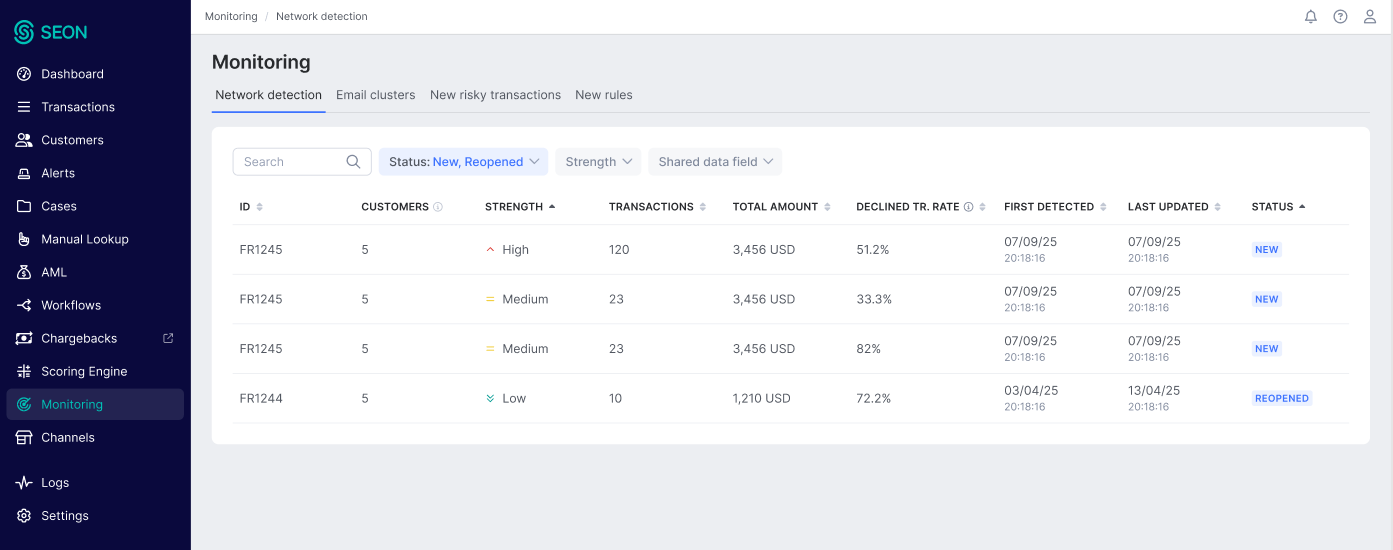
The network list displays a declined transaction percentage column, which shows the initial decline rate at the time the network was first detected. This metric helps analysts quickly assess the financial risk associated with each network and prioritize accordingly.
Searching and filtering networks
Network detection provides search and filtering capabilities to help analysts locate specific networks quickly, reducing triage and assessment time.
Search by network ID and transaction ID
Analysts can search for a specific network directly by entering its network ID. This is useful for quickly navigating to a network referenced in a notification, a report or a colleague's investigation. It is also possible to search for networks by a transaction ID that is present in any of the networks.
Filtering by data field
Analysts can filter networks based on the data fields present in the connections. This search returns all networks that have at least one connection involving the specified data field.
- Eligible fields: All fields that are eligible for network grouping and forming connections.
- Search behavior: Only one field name can be selected for filtering using the drop-down.
- Combined filter criteria: Status and strength filters accept multiple values. However, a single shared data field can be selected for filtering. These criteria are combined with an AND condition to produce the filtered list of networks detected.
Sorting
The network list can be sorted by the network ID, count of transactions, declined transaction percentage, total amount, network strength, first detected, last updated, number of customers and status.
Network details
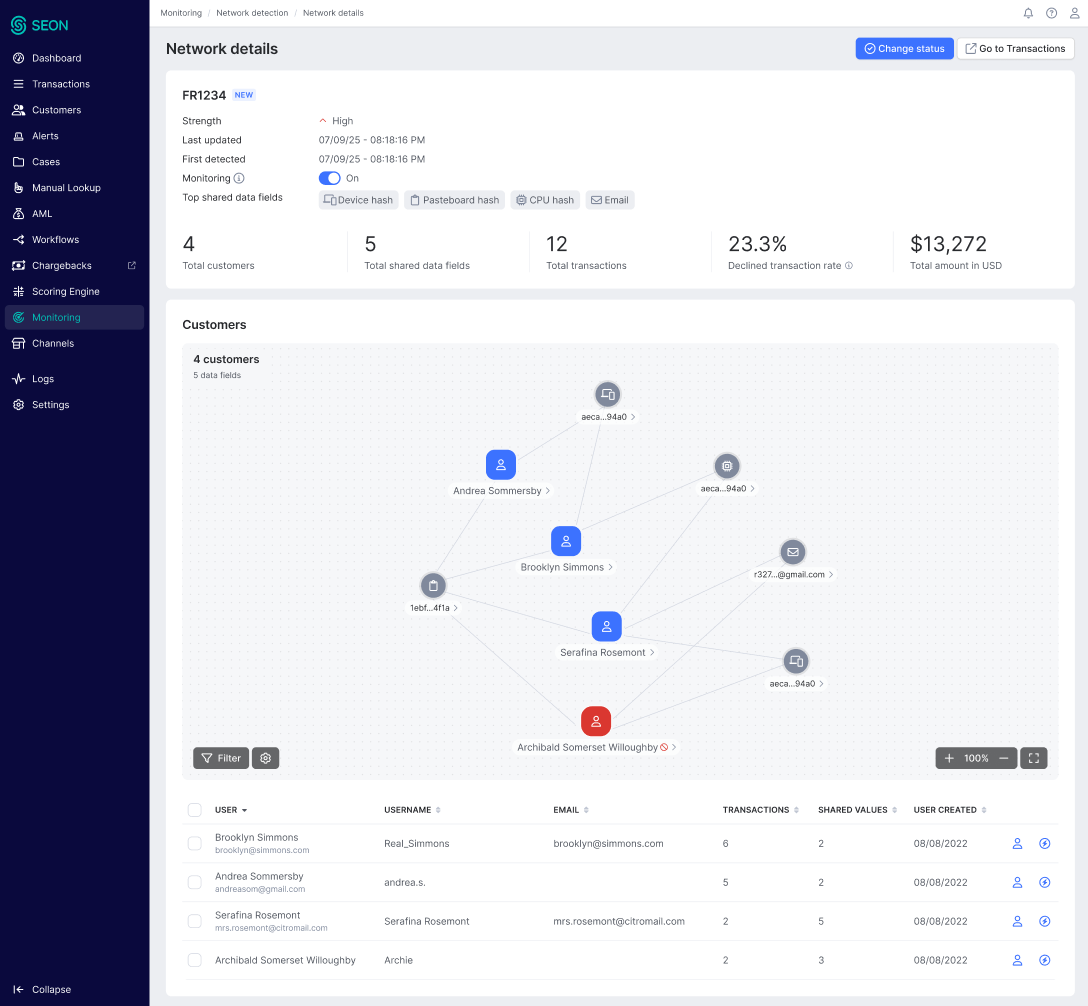
Clicking on a network opens its details page, which provides a comprehensive view for investigation. This page is designed to tell the story of the suspicious group and includes:
- Key characteristics: A summary of the network's size, the total monetary amount affected and a list of the specific data points shared among its members.
- Network visualization: An interactive graph that visualizes the connections between customers in the network.
- Customer and transaction lists: Detailed tables listing all customers and their underlying transactions within the network, allowing for drill-down analysis and batch actions.
Drill down to customer details
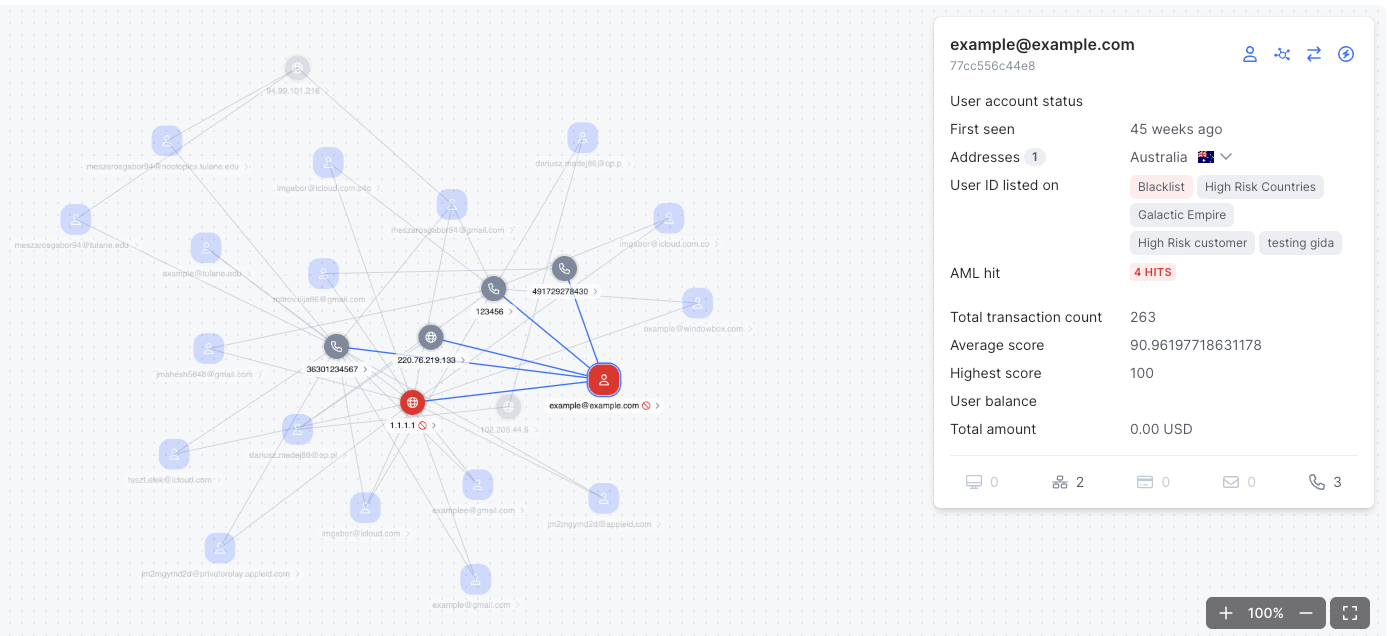
When you click on a customer on the network chart, it reveals essential risk data about that customer: general history and customer profile data and critical risk statistics like average fraud score and highest score. On this pop-up, the investigator can jump to the customer page right away or extend the investigation by running network analysis on this customer to explore its network, similar customers and explore its data.
Managing network statuses
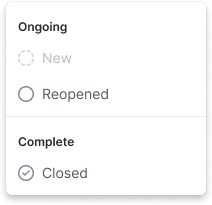
After completing an investigation, analysts can update the network's status to reflect their findings and manage the ongoing monitoring workflow. Statuses are grouped into two main categories: Ongoing and Complete.
Ongoing statuses
Ongoing statuses represent networks that require active investigation.
- New: The default status for a network when it is first detected. It indicates that the network is ready for its initial review.
- Reopened: This status is automatically assigned to a previously closed network when new members are added to it and monitoring remains active. It signals that the network requires a new investigation.
Complete statuses
When an investigation is finished, you move the network to a complete status.
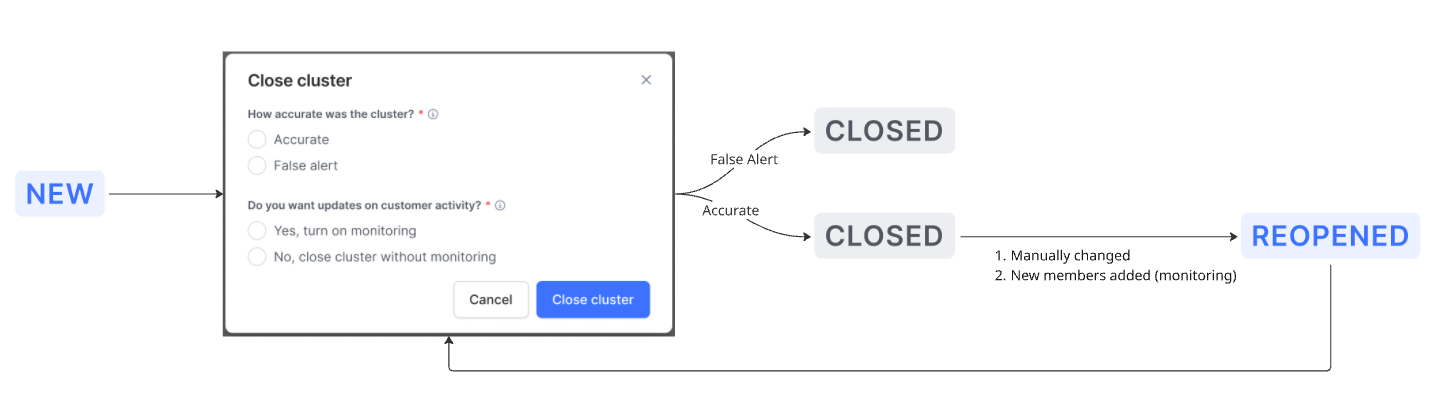
- Closed: This status marks the investigation as complete. When you change a status to closed, a feedback window will appear, prompting you for two key pieces of information.
Provide feedback on accuracy
You must classify the network to help refine the detection algorithm.
- Accurate: Select this if the investigation confirmed that the network represents coordinated, malicious activity.
False alert: Select this if the investigation found that the network was coincidental and does not represent a threat. This will disable further notifications when new members are added to the network and remove it from the network list. False positive networks are not reopened.

Choose a monitoring option
You must also decide if SEON should continue to monitor the members of this network.
- Yes, turn on monitoring: Choose this to keep tracking the network. If new members are added later, the network’s status will automatically change to Reopened, and you will be notified.
- No, close network without monitoring: Choose this if you have mitigated the risk (e.g., by blocking users or creating new rules) and do not need further updates. The network will remain closed, and you will not receive notifications even if new, related activity is detected.
FAQ
What are the prerequisites for using network detection?
Calling the Fraud API is a hard prerequisite. Network detection is available for teams that use SEON's UI for investigations and the integrated Fraud API. Your Fraud API traffic should include transactions with monetary value, email or phone data enrichment and a mix of statuses (DECLINE, APPROVE, REVIEW) for the feature to deliver meaningful results.
How quickly are new transactions processed?
A transaction is typically ready for network detection within two hours of being received. The detection algorithm runs continuously in the background, ensuring that emerging networks are surfaced promptly as new data arrives.
How far back does the analysis go?
The algorithm operates on the most recent two months of transaction data. This window ensures that detected networks remain relevant and reflect current activity patterns.
When will I see my first network?
The timing depends on your traffic volume and the fraud patterns your business faces. Networks are surfaced when the algorithm identifies suspicious coordinated activity among your customers. If there is no coordinated malicious activity in your data, no networks will be created — this is expected behavior, not a sign that the feature is not working.
What does network strength mean?
Each network is assigned a strength category (High, Medium or Low) based on how strongly its members are connected and how fraud-relevant the connecting data points are. High-strength networks should be prioritized for investigation, while low-strength networks may warrant a lighter review.
Can I customize which data fields are used for detection?
Yes. Administrators can configure exact matching fields, assign importance weights, exclude specific values and adjust the minimum network size through the AI & ML Settings page. Changes apply only to newly detected networks and do not retroactively alter existing ones.
What happens when I close a network?
When closing a network, you are prompted to classify it as Accurate or False Alert and to choose whether monitoring should continue. If monitoring is enabled, the network will reopen automatically when new members are added. If monitoring is disabled, the network remains closed and no further notifications are sent, though it will still be updated in the background.
What is a false alert, and can a false alert network be reopened?
A false alert is a network that, after investigation, was found not to be tied to malicious activity. Setting a network to False alert disables notifications and removes it from the default network list. False alert networks are not reopened.
How does the false positive protection work?
To prevent networks from forming around coincidental or generic data, the system automatically excludes overly common values from the matching process. If a specific data value appears across a disproportionately large share of transactions for a given field, it is excluded from detection. This ensures that networks are based on genuine indicators of coordinated activity.
Can I search for a specific network or transaction?
Yes. You can search by network ID to navigate directly to a specific network or search by transaction ID to find any network that contains that transaction. You can also filter networks by a specific data field used as a connection.
How does network detection complement my existing rules and ML scores?
Network detection is designed to identify suspicious activity that may have evaded existing rules and ML scores, including approved transactions that are part of coordinated rings. The patterns discovered through network analysis serve as a feedback loop: you can use these insights to strengthen your rule sets and improve labeling, which enhances your reactive defenses over time.