


NFC verification

Updated on 07.08.26

4 minutes to read

Copy link
Overview
NFC verification reads the embedded chip in NFC-enabled identity documents to provide cryptographic proof of document authenticity. Where optical document verification analyzes the visual appearance of a document using AI, NFC verification directly interrogates the chip’s signed digital data, confirming that the chip has not been tampered with and the data it holds matches what is printed on the document.
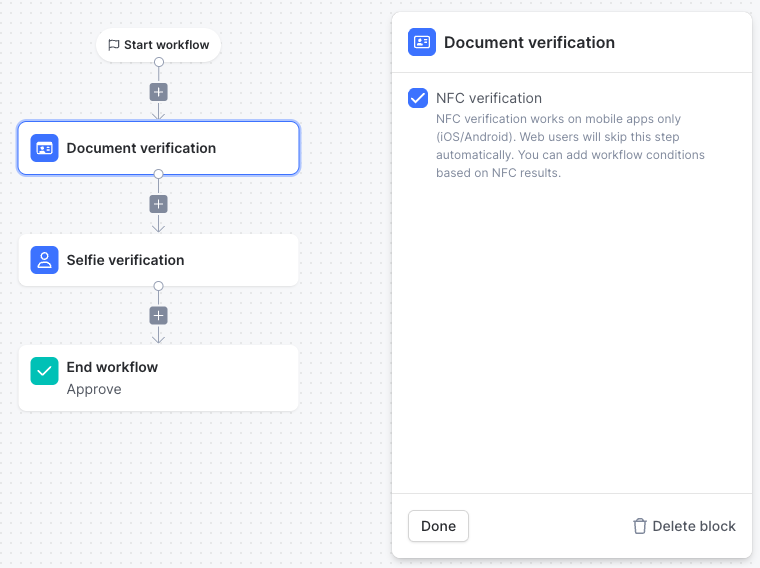
NFC is an optional enhancement to the Document Verification identity checks and can be switched on when configuring a workflow within the Document verification node. When enabled, it runs automatically after optical capture if the user’s device and document both support it. When either condition is not met, the flow continues without NFC and the verification outcome is based on the optical result alone.
How it works
- Document capture: The user captures their document through the standard guided document capture flow. During this step, SEON recognises documents with NFC chips and prompts user to read it.
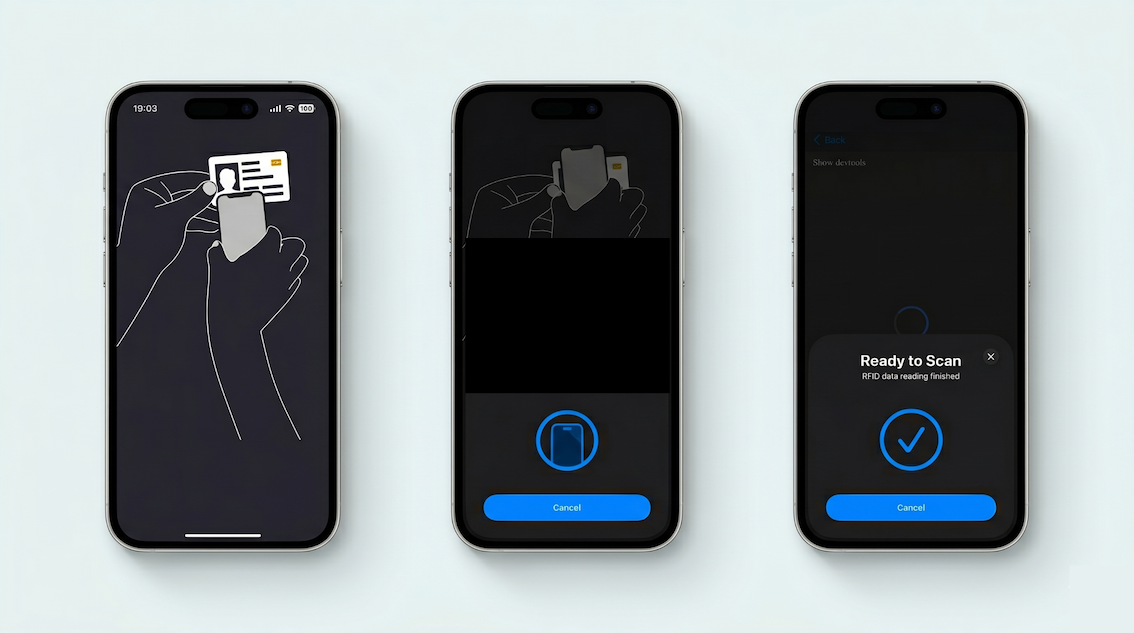
- NFC chip reading: If a chip is detected and the user’s device supports NFC, the user is prompted to hold their phone against the document. The SDK reads the chip’s RFID data, which includes the biographic data page, face photo and cryptographic authentication certificates.
- Chip authentication: SEON validates the chip data using three authentication checks: Passive Authentication , Chip Authentication and Active Authentication. Results are returned per sub-check.
- Unified verification results: An Approved/Review/Failed outcome is returned via webhook and the SEON platform. When NFC data is available, the RFID-extracted face photo is used for face matching instead of the optically captured image, providing higher-assurance biometric comparison.
Verification checks
| Check | What it validates |
|---|---|
| Passive Authentication | Verifies the chip’s data is digitally signed by the document’s issuing authority and has not been altered since issuance |
| Chip Authentication | Confirms the chip is a genuine hardware component and has not been cloned or emulated |
| Active Authentication | Verifies the chip responds correctly to a dynamic cryptographic challenge, confirming the physical chip is present in the document |
| Chip-OCR consistency | Cross-references key fields (name, document number) between chip data and optically extracted data to detect alterations to the printed surface |
Data extracted
When NFC reading succeeds, the following data is extracted from the chip and surfaced in the verification result alongside standard optical fields:
- Face photo: Data comes from the RFID chip and is used for face matching when available because it is higher quality than an optically captured image
- Full name: Data comes from the RFID chip and is cross-checked against OCR extraction.
- Document number: Data comes from the RFID chip and is cross-checked against OCR extraction.
Other fields collected by the RFID chip include date of birth, nationality and the document expiration date
Fallback behavior
NFC verification is designed to degrade gracefully. If NFC cannot be completed, the verification flow continues without it so the overall session outcome does not automatically fail.
| Condition | Flow behavior |
|---|---|
| Device does not support NFC | NFC step skipped silently; optical result used |
| Document has no chip (or chip not detected) | NFC step skipped; optical result used |
| NFC enabled but not configured for this workflow | NFC step skipped |
| User closes the app or abandons during NFC scan | Session status set to ABANDONED in webhook and API |
| Electronic driver’s licence requires a password not available from OCR | Falls back gracefully; password-protected eDLs are treated as unsupported |
You can use the NFC check result to guide how sessions are handled based on the outcome of the NFC step.Depending on the result, sessions can be directed to different flows. For example, cases where NFC is not supported on the device can continue through a standard optical-only process, while unsuccessful NFC attempts can be routed for additional or manual review.
Supported documents
NFC verification works with any government-issued document that contains an ICAO 9303-compliant RFID chip, including:
- E-passports (all ICAO 9303-compliant; the most widely supported document type)
- National identity cards with embedded chips (varies by country)
- Electronic driver’s licences (varies by jurisdiction; password-protected eDLs may not be supported)
- Residence permits with chips
Document support is determined by our document library, which covers 254 countries and territories. Chip presence is detected automatically, and users are not asked to select whether their document has a chip.

Use cases
- High-assurance onboarding: For regulated industries (banking, fintech, gaming) where a cryptographic proof of document authenticity is required or strengthens compliance posture beyond what optical verification alone provides.
- Fraud prevention: Eliminate the possibility of a fraudster submitting a high-quality counterfeit document that passes optical checks but fails chip authentication, since a cloned or forged chip cannot replicate the issuing authority’s cryptographic signature.
- Biometric face matching uplift: Use the RFID-extracted chip photo for face matching rather than the optically captured image, increasing the accuracy and assurance level of selfie comparison.
- eIDAS / regulatory compliance: Support identity proofing requirements that mandate chip verification as part of a Baseline or Extended LoIP identity proofing process.
SDK integration
NFC verification is initiated and managed through SEON’s mobile SDKs. It is enabled within the Document Verification node in the SEON Workflow Editor, with no need for a separate workflow step.
Once enabled, the iOS and Android SDKs automatically handle chip detection, user guidance, and NFC reading. No additional SDK configuration is required beyond activating the NFC option in the workflow.
To start a verification, your application initializes the SEON SDK and runs a document verification session with NFC enabled. The SDK manages the full user experience, including NFC interaction and secure transmission of results to SEON’s servers.
