


Address Intelligence

Updated on 22.10.26

10 minutes to read

Copy link
Overview
Address Intelligence verifies, standardizes, and enriches the user, billing, and shipping addresses on a transaction in a single Fraud API call. It confirms whether an address is real, what type of property it is, and whether other accounts have transacted from the same physical building — even when each address was typed differently.
Coordinated fraud rings often anchor themselves to a small number of physical locations: a residential house collecting dozens of accounts, or a freight-forwarding warehouse receiving reshipped goods. Address Intelligence turns address strings into deterministic identifiers you can use directly in rules and Network Detection to catch this.

How Address Intelligence works
Address Intelligence adds three layers of insight to every address you send. It runs inside the Fraud API v2 call you already make, so there is no separate endpoint, authentication method, or rate limit to manage.
- Verification and standardization: confirms the address exists against postal-authority data across 240+ countries and returns a corrected, standardized version ready for comparison.
- Deduplication: converts each verified address into two deterministic canonical IDs so you can match the same location regardless of formatting.
- US enrichment: for US addresses, adds property-level and USPS delivery signals drawn from United States Postal Service (USPS) data and SEON's own databases.
The depth of data varies by region: verification, standardization, and canonical IDs are available worldwide, while property and USPS enrichment and geocoding are US-only. See coverage between US and international addresses below.
Verify and standardize addresses globally
Every address submitted is checked against postal authority data across 240+ countries. Address Intelligence confirms whether the address exists, corrects formatting inconsistencies, and returns a standardized version that's ready for comparison.
Results use the spelling and script of the country’s postal service, so Elisabethstrasse 13 and Elisabethstraße 13 return the same standardized address and the same canonical IDs. International results can include accented letters and non-Latin scripts such as Japanese or Arabic.
Each result carries a verification status and a precision label. Status is the overall outcome — a fully verified and deliverable address, a partial match, or an address that could not be found. Precision tells you how closely the input was matched, from a specific mailbox (delivery point) down to a general area such as a city or state, so you know how much to trust the result.
Deduplicate addresses with canonical IDs
Every verified address is converted into two deterministic identifiers, so the same physical location always produces the same ID no matter how it was typed.
- Full canonical ID: a deterministic identifier for the exact address, including any apartment or unit number.
- Base canonical ID: a deterministic identifier for the building itself, with the apartment or unit stripped away.
Because these IDs are deterministic, Apt 4B, #4B, Unit 4B, and Suite 4-B at the same building all resolve to the same ID. This lets you count how many accounts are tied to a single physical location regardless of formatting, and it defeats a common evasion pattern: registering many accounts at one building while cycling the apartment number (Apt 1, Apt 2, Apt 999) to make each look unique. Because the base canonical ID removes the unit, all of those map to one building-level identifier.
Canonical IDs power three workflows:
- Velocity rules that count distinct users at the same building over time.
- Network Detection searches that surface every account transacting from a specific location.
- Building-level comparison of a user's billing and shipping addresses, even when the text differs.
Get deeper signals for US addresses
For US addresses, Address Intelligence adds property-level signals sourced from USPS data and SEON's own databases: property type (residential or commercial), freight forwarder detection, commercial mail receiving agency (CMRA) detection, vacancy status, and delivery point validation.
A residential address receiving shipments for 50 different accounts reads very differently than a commercial office doing the same. Freight forwarders and CMRAs — mailbox rental services such as a UPS Store — are legitimate businesses, but both are commonly used to reship goods internationally or obscure a customer's true physical location.
Signal | What it tells you |
Property type | Whether the address is residential or commercial, derived from the USPS Residential Delivery Indicator (RDI). A residential address receiving shipments for 50 accounts is a very different signal from a commercial office doing the same. |
Freight forwarder match | Whether the address matches SEON's database of known freight-forwarding locations — businesses that receive packages and reship them internationally, which makes chargebacks nearly impossible to recover. |
Commercial mail receiving agency (CMRA) | Whether the address is a mailbox-rental service (such as a UPS Store). These are legitimate businesses, but are also used to obscure a recipient's true location. |
Vacancy status | Whether USPS reports the address as currently unoccupied and not receiving mail — a signal of a possible drop point. |
Delivery point validation | A USPS confirmation code indicating whether the specific mailbox exists and can receive deliveries. |
Geocoding | Latitude and longitude for the address, at USPS ZIP-level resolution. |
Coverage: US vs. international addresses
Address Intelligence works globally, but the depth of data varies by region. Verification, standardization, and canonical IDs for deduplication are fully available worldwide, and the same rules and Network Detection workflows apply everywhere.
Capability | US addresses | International addresses (240+ countries) |
Verification status | Yes | Yes |
Precision label | Yes | Yes |
Full canonical ID | Yes | Yes |
Base canonical ID | Yes | Yes |
Standardized address components | Yes | Yes |
Property type (residential / commercial) | Yes | No |
Freight forwarder detection | Yes | No |
CMRA detection | Yes | No |
Vacancy status | Yes | No |
Delivery point validation | Yes | No |
Geocoding (latitude / longitude) | Yes | No |

Review addresses in the Addresses widget
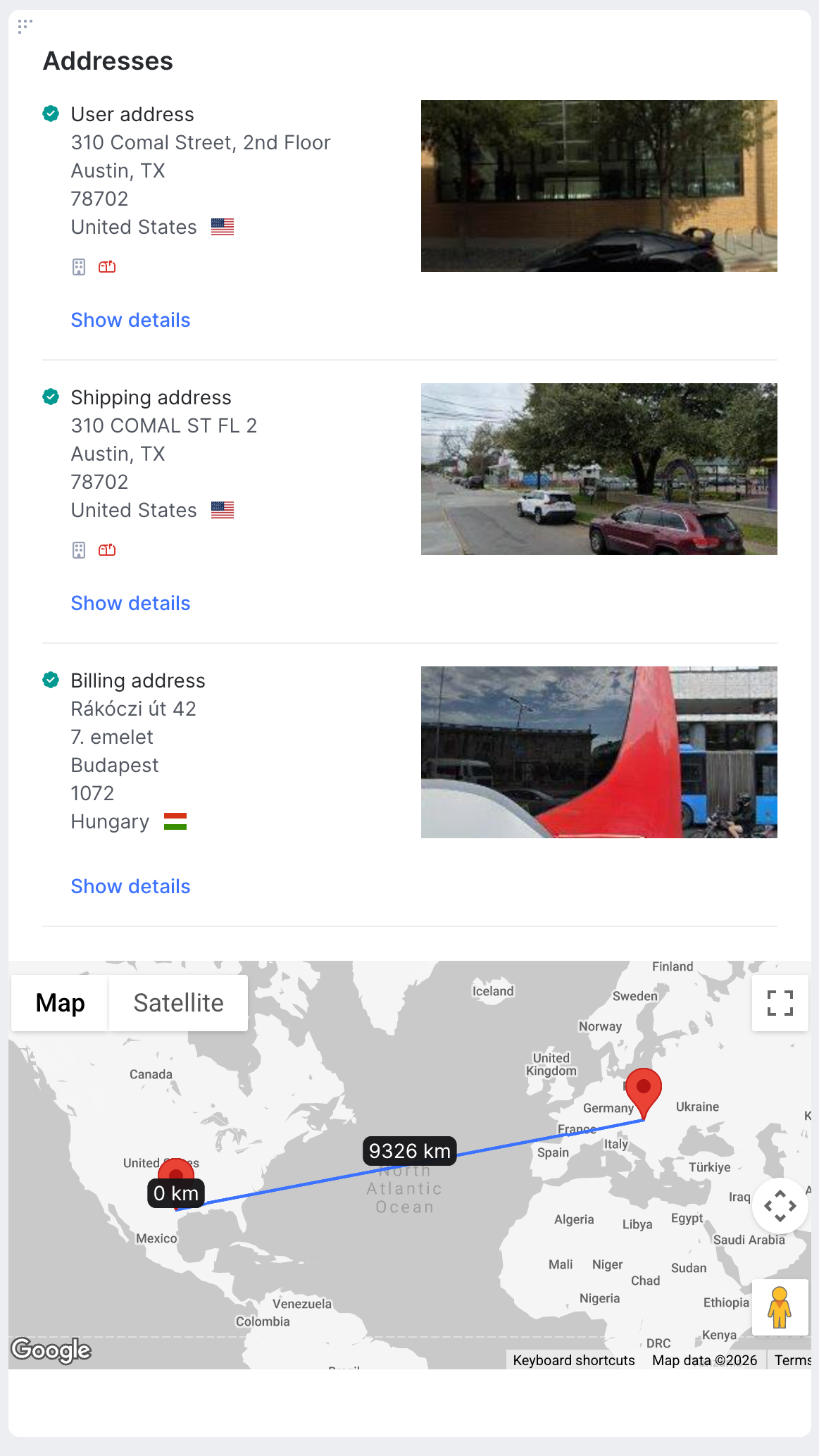
The Addresses widget on the transaction detail page gives a visual summary of physical-address risk during a manual review. Instead of reading raw text, you see colored dots for verification status — green for verified, yellow for partial, red for not found, grey when verification was not run. For US addresses, inline icons highlight key risk signals such as CMRA, a known freight forwarder, or a vacant address.
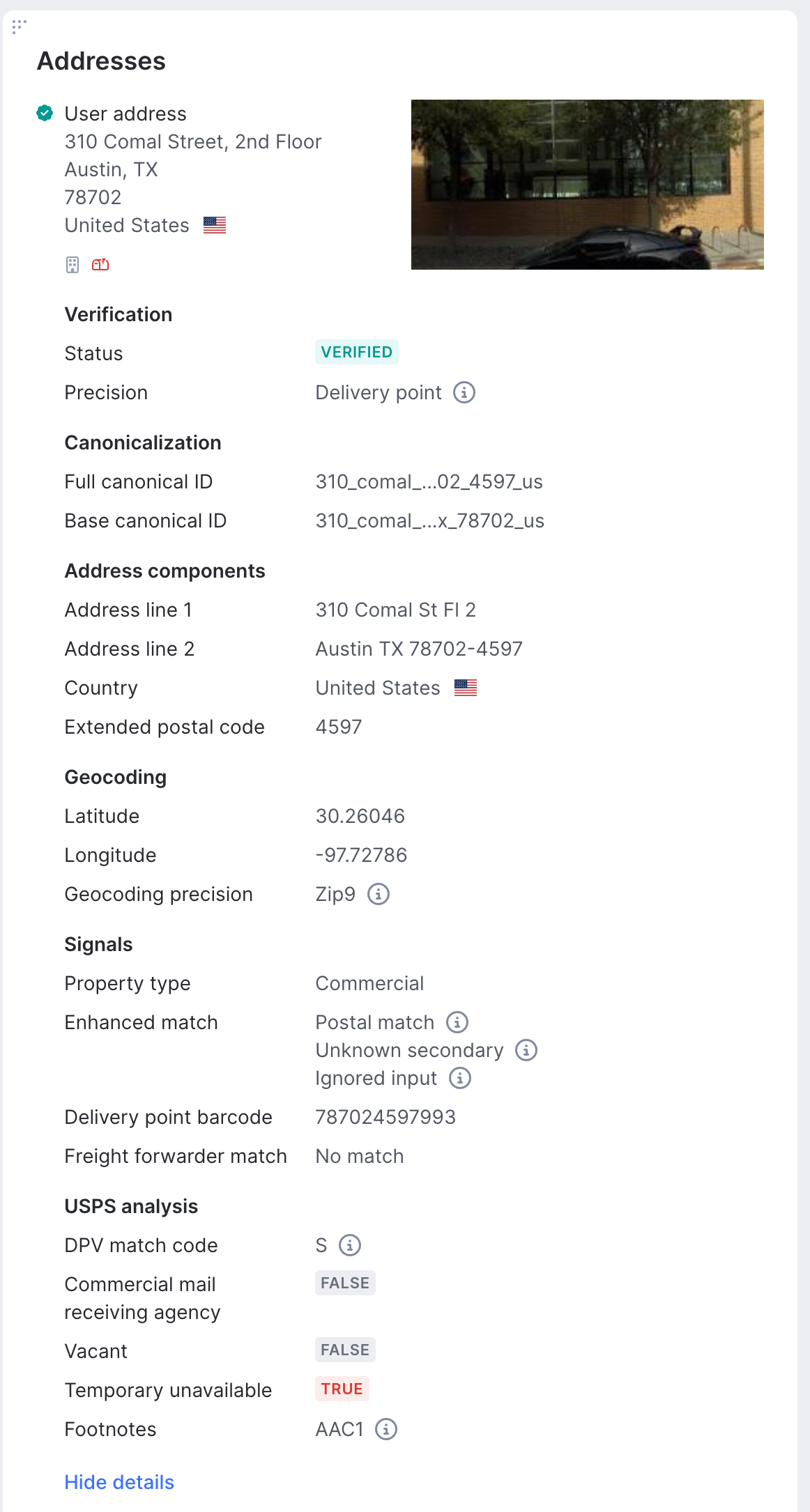
Expanding an address reveals its full canonical ID and base canonical ID alongside the standardized address components, geocoding, and — for US addresses — the USPS signals described above. Copy the base canonical ID directly from the widget and paste it into Network Detection to see every other account that has touched the same physical building.
Build address rules in the Scoring Engine
Address signals are fully integrated into the Scoring Engine as rule fields — one set per address type (user, billing, shipping). You can build rules manually or describe your logic in plain language with the AI Rule Builder, and use address data across all three custom rule parameter types:
- Compare rules: check one signal against a value, such as triggering when a shipping address matches a freight forwarder, or when the user's property type is commercial.
- Data match rules: compare two values in the same transaction, such as flagging when the shipping country differs from the billing country, or when the user and shipping base canonical IDs do not match.
- Velocity rules: monitor a value over time, such as counting distinct users that share the same shipping base canonical ID in the last 24 hours.
Because canonical IDs are deterministic, velocity rules count activity at a location accurately no matter how the address formatting is altered. Canonical IDs can also be matched against custom lists, so you can flag any address that appears on a list of known fraudulent locations. For the exact field names and the operators available per field, see Address Intelligence docs.

Link physical locations in Network Detection
Address Intelligence adds physical location as a first-class linking attribute in Network Detection, alongside existing identifiers like cookie hashes, device IDs, and email addresses. Network Detection continuously analyzes transaction data and proactively surfaces groups of accounts that share a physical building, even when their address strings look nothing alike.
Under Settings - AI & Machine Learning, add the canonical IDs for each address type as network grouping fields. We recommend a high field weight — 8 or 13 — since a shared physical building is a strong indicator of coordinated activity.
Once configured, accounts that cycle through different apartment numbers at the same building still share the same base canonical ID, so Network Detection connects them automatically.
How to enable Address Intelligence
Get access
Address Intelligence is a premium add-on, billed separately from other SEON fraud and AML compliance tools. To enable it, contact your account manager. Once it is active on your account, you opt in per transaction through your existing Fraud API v2 requests — there is no separate endpoint, authentication method or integration to build.
How to request address signals
Enable Address Intelligence inside a Fraud API v2 request by turning on address verification in the request configuration, choosing which of the user, billing, and shipping addresses to verify, and including the address results object in your requested response fields. A country and a street are required for any address you want verified; addresses missing these are skipped and not billed.

Billing and usage
Each verified address counts as one verification, shown on the API Stats page and split into US and international counters. Only addresses that successfully return a result are billed. Address types with no input, addresses missing the required fields, and requests where address verification is enabled but no address is actually verified run nothing and incur no charge.