


User Session Monitoring - Connecting the Digital Journey to Fraud Decisions

Updated on 23.07.26

4 minutes to read

Copy link
User Session Monitoring
SEON Session Monitoring connects a user’s full digital journey to fraud decisions. It uses a lightweight client-side SDK to collect session behavior and generates a stream_id. The customer backend sends this stream_id in the Fraud API request, allowing SEON to link the session to critical events such as login, registration, checkout, money movement, and account recovery.
Session Monitoring works alongside the SEON Fraud API, Device Intelligence, the Scoring Engine, and analyst workflows. Rather than replacing existing fraud checks, it adds crucial behavioral context that shows exactly what happened before, during, and after a transaction. Outputs can appear in the Fraud API response, Scoring Engine, Transaction Details page, and Session Monitoring views.

What Problem It Solves
Most fraud decisions rely on point-in-time data (e.g., IP, email, phone, device fingerprint, transaction amount, and account history). While important, static checks fail to capture how a user behaved during the session. Session-level behavior reveals risks missed by static checks, such as:
- Information entered by copying and pasting into form fields.
- Active phone calls occurring during account recovery or payments.
- The use of remote access or screen-sharing software.
- Forms completed unusually quickly or in a bot-like manner.
- Changes to IP address, VPN, proxy, locale, browser, or device context mid-session.
- Repeated off-screen activity while entering personal or payment information.
- Signs of automation, remote access, or real-time voice coaching progressing throughout the flow.
Key Benefits
| Benefit | What it means in practice |
|---|---|
| Full-session visibility | Analysts can reconstruct the user journey from session start to end, including screens visited, interaction timing, idle time, off-screen time, and linked transactions. |
| Better detection beyond device fingerprinting | Identifies behavioral patterns that a static device check cannot capture, including automation, coaching, remote access, and mid-session manipulation. |
| Native transaction linkage | Passing stream_id into the Fraud API links session behavior directly to the transaction being evaluated. |
| Deterministic risk flags | Session behavior is converted into clear risk indicators such as ui_automation, remote_access, ip_change, off_screen, potential_vishing and more. |
| Scoring Engine readiness | Session risk flags are available for rules so analysts can build deterministic session-based decisioning. |
| Analyst-friendly investigation | Session timelines and form interaction aggregation reduce investigation time and help analysts understand exactly what happened. |
| Privacy-first behavioral capture | The SDK only records interaction metadata, not raw input values or PII data such as passwords, credit card numbers, or personal field contents. |
| Cross-platform coverage | SDK support covers web, native Android, and native iOS applications. |
Use Cases
- Login and Account Takeover: Helps detect suspicious login, account recovery, and profile-change behavior (e.g., off-screen activity during credential entry, IP changes, VPN/proxy use).
- Registration and Onboarding: Flags automated signups, unrealistic form completion speed, non-human typing patterns, and repeated paste events.
- Checkout, Payment, and Withdrawal: Evaluates behavior surrounding high-risk transactions for signs of scripting, coaching, remote access, or device manipulation.
- Coached Fraud and Vishing: Identifies long idle periods, active calls on mobile, and hesitation via active_call or potential_vishing flags.
- Remote-Access Fraud: Surfaces remote control and screen-sharing tools commonly used in banking scams and account takeovers.
- Bot and Automation Detection: Captures movement, focus, typing, and form-fill behaviors over time to catch advanced bots that pass simple page-load checks.
Signals That Usually Deserve Attention
| Pattern / Flag | Why it matters |
|---|---|
| remote_access (payment/withdrawal/recovery) | Strong sign of remote control or scam involvement. |
| ui_automation (registration/login) | May indicate bot activity or scripted abuse. |
| potential_vishing + active_call | May indicate real-time social engineering or voice coaching. |
| off_screen (sensitive data entry) | User may be copying instructions or data from another app or tab. |
| Multiple pasted fields | May suggest stolen data, scripted input, or coached behavior. |
| ip_change during one session | May indicate VPN/proxy switching, network manipulation, or unusual connectivity. |
| Very fast form completion | May indicate automation or pre-filled stolen data. |
| Long idle periods before sensitive actions | May indicate hesitation, waiting for instructions, or social engineering. |
Practical Notes for Fraud Analysts
How to Review a Suspicious Session
- Check the transaction result first: Look at fraud score, state, applied rules, user history, device, IP, and transaction details.
- Open the Session Monitoring widget: Check whether the session is linked and whether risk flags exist.
- Review the timeline: Look for unusual timing, off-screen activity, sudden context changes, or risky behavior before the transaction.
- Review form interactions: Check for repeated paste events, very fast completion, no corrections, excessive corrections, or off-screen behavior while editing sensitive fields.
- Check linked transactions: See whether the same session includes login, account update, checkout, payment, withdrawal, or recovery steps.
- Combine with other SEON signals: Do not treat most session flags alone as final proof unless the risk is high and policy supports action.
Analyst workflow in SEON Admin
Transaction Details page
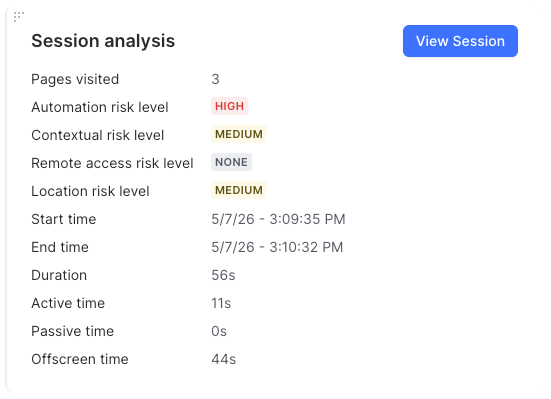
When a transaction is linked to a session, the Transaction Details page shows a Session Analysis widget.
The widget can show:
- Session start and end time
- Session status
- Number of pages or screens visited
- Active time
- Idle time
- Off-screen time
- Detected risk categories and risk levels
- Entry point to the Session Details modal
This helps analysts quickly decide whether the transaction has suspicious session behavior.
Session Details modal
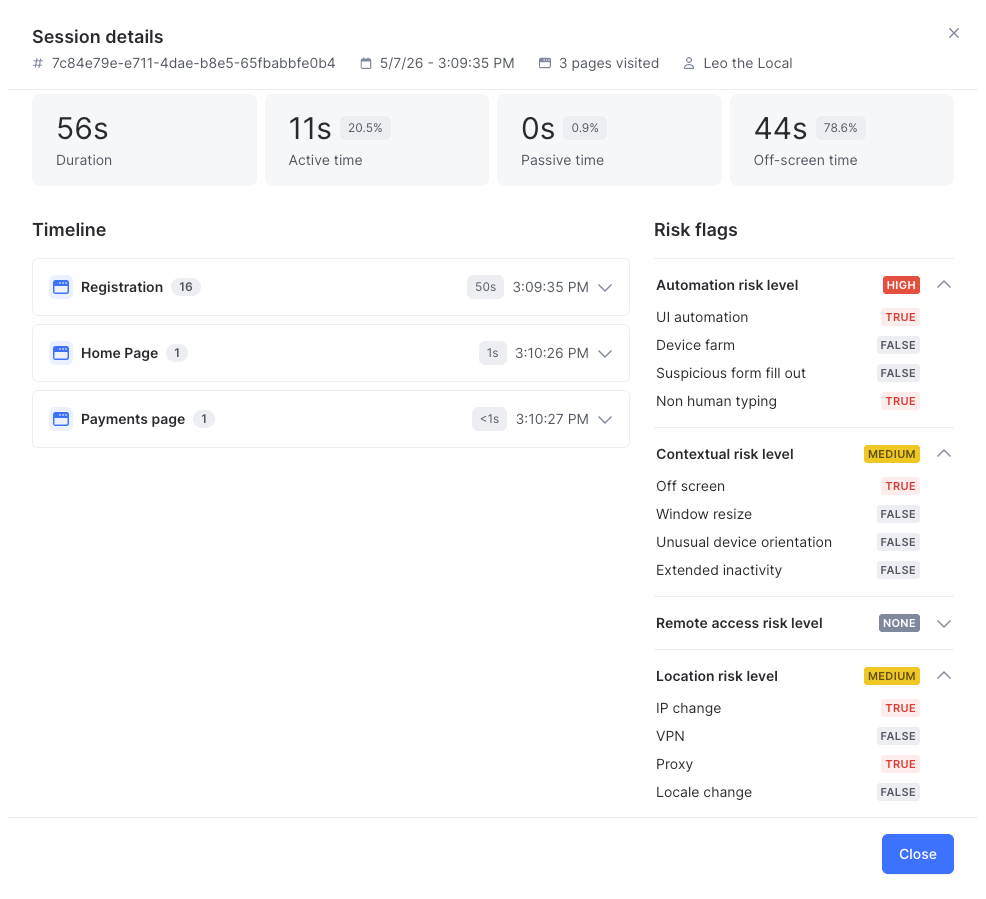
The Session Details modal gives deeper context without leaving the transaction.
It includes:
- Full session summary
- Chronological timeline
- Risk flags grouped by page or screen
- Linked Fraud API transactions from the same session
- Form interaction aggregation
- Navigation back to the original transaction
This is useful when one session contains multiple Fraud API calls, such as login, profile update, checkout, and payment authorization.
Session Timeline
The timeline reconstructs the user journey in order.
| Field | Description |
|---|---|
| Page / Screen Name | Localized name, URL path, route, Activity, Fragment, or view-controller identifier. |
| Time spent on page | Total duration the page or screen was active. |
| Elapsed session time | Timestamp relative to the start of the session. |
| Interacted inputs | Fields touched and duration of interaction. |
| User actions | Key clicks, taps, swipes, submissions, and custom events. |
| Risk flags | Warnings triggered on that page or screen. |
| Linked Fraud API transactions | API calls made while the user was on the page or screen. |
Form Interaction Aggregation
Form aggregation helps analysts spot bot-like entry, copy-paste behavior, hesitation.
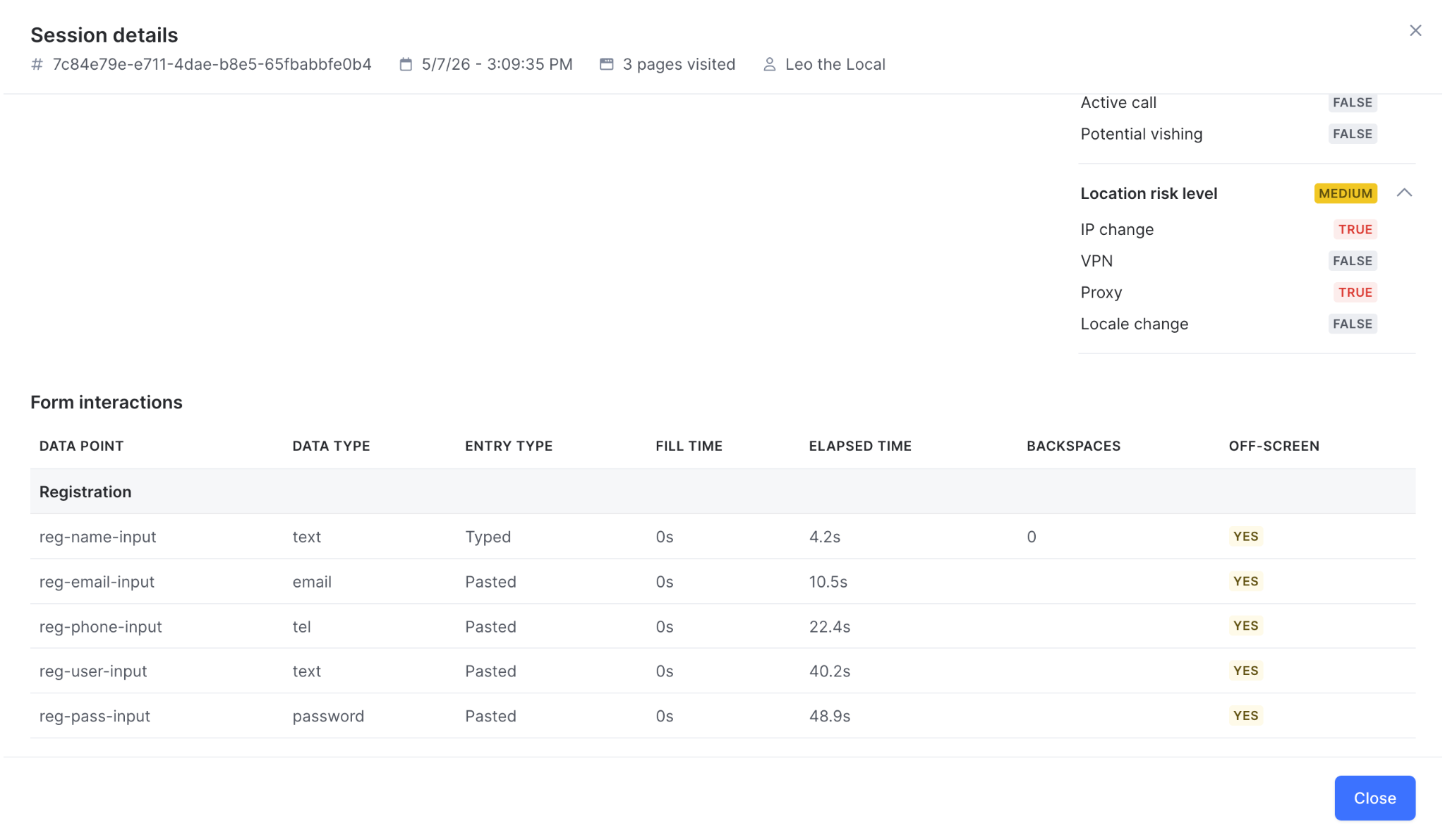
Data point | What it tells the analyst |
| Form name | Which form was used, such as Login, Registration, or Checkout. |
| Input name or label | Which field was edited, such as Email, Password, First Name, or Card Number. |
| Entry type | Whether the value was typed, pasted, autofilled, selected, or clicked. |
| Time spent editing | Whether the interaction was too fast, too slow, or unusual. |
| Backspace count | Whether the user corrected values, which may suggest natural typing or unfamiliarity. |
| Off-screen occurrences | Whether the user went off-screen while filling the field. |
| Elapsed time | When the interaction happened during the session. |
The SDK does not collect or expose raw input values.
Common False-Positive Scenarios
| Signal | Possible Legitimate Reason |
|---|---|
| off_screen | User checked SMS, email, banking app, password manager, or 3DS challenge. |
| active_call | User was already on a call, using customer support, or multitasking. |
| Paste events | User used a password manager, copied address details, or pasted card/account data from a secure app. |
| vpn / ip_change | User uses a corporate VPN, mobile network switched, Wi-Fi changed, roaming, or unstable connection. |
| window_resize / Long idle time | User changed browser layout, used split screen, paused to find documents, or complete another step. |
Scoring Engine Guidance
Session Monitoring risk flags are best suited for Compare-style rules that test whether a session contains a specific risk indicator. Good rule design usually combines one session signal with one or more non-session signals (like high-value withdrawals, new account registration, or new payout destinations).
| Rule Concept | Example Condition | Recommended Action |
|---|---|---|
| Remote access during checkout | Session has remote_access | Review, step-up, or decline based on value and industry. |
| UI automation during registration | Session has ui_automation | Block or review for high-abuse flows. |
| Suspicious form fill-out + new account | Session has suspicious_form_fill_out and user is new | Increase score or review. |
| Active call during sensitive action | Session has active_call during payment/withdrawal/recovery | Step-up or review. |
| Potential vishing | Session has potential_vishing | Review or require additional verification. |
| IP change mid-session | Session has ip_change | Combine with device, account, and transaction risk. |
| Off-screen behavior during payment entry | Session has off_screen on payment/personal-data form | Add risk score or review. |
| Device farm indicator | Session has device_farm | Block or review depending on policy. |
Implementation Checklist
For Product and Engineering Teams
- Add the Stream SDK to web, Android, or iOS apps.
- Start the session and retrieve
stream_idfrom the client. - Send
stream_idin the relevant Fraud API request with the necessary configs. - Validate that session_monitoring_details appears in the Fraud API response and Transaction Details widget is populated.
- Tag important screens, forms, fields, and buttons with meaningful names.
- Confirm optional mobile permissions if active call, VPN, proxy, or network signals are required.
For Fraud Operations Teams
- Define which session flags should trigger review, step-up, or decline.
- Build Scoring Engine rules using high-confidence and combined-signal logic.
- Train analysts on the timeline, form aggregation, and common false positives.
- Review early cases manually before applying strict automated decisions.
- Track confirmed fraud and false positives to tune rules.
- Create playbooks for remote access, vishing, automation, and account recovery scenarios.
Session Monitoring gives fraud teams behavioral context that standard transaction and device checks cannot provide on their own. Its strongest value comes from linking the session to the Fraud API decision through stream_id, then using session risk flags and analyst views together with existing SEON signals.