


Electronic Identity Verification (eID)

Updated on 07.08.26

5 minutes to read

Copy link
Overview
Electronic identity verification or eID confirm’s a user’s identity by having them authenticate with their government-backed digital identity such as a national electronic ID or bank ID, instead of photographing a physical document. The identity details SEON receives are attested by the issuing authority itself, not extracted from an image, which makes eID one of the fastest, highest assurance ways to verify a user in markets where digital identity adoption is high.
eID is one of two non-document verification methods SEON offers, alongside eKYC. Both confirm identity without a photographed ID.
How eID is different from document verification and eKYC
Most identity checks start from a document image. eID starts from an authentication event and that’s the core difference from SEON’s other identity methods.
eID verification vs. document verification
Document verification reads a photographed ID with AI and OCR, checks it for tampering and confirms it's genuine.The data returned comes from an image. eID does not require image processing because the user signs in to their government or bank digital identity the same way they'd access their bank or a public service and the identity attributes come from the issuing authority directly. There is no document image to capture, misread, or forge.
eID vs. document verification enabled with NFC
eID verifies a digital identity credential with no document involved at all. NFC verification reads the secure chip in a physical passport or ID card to confirm the document is authentic. The two are complementary: a bank might use both when it needs the highest possible assurance.
eID verification vs. eKYC
The two non-document verification methods
eKYC confirms details a user types in including their name, date of birth and ID number by cross-referencing them against official databases; it doesn't require the user to authenticate anywhere. eID, however, requires the user to actively authenticate with a digital identity credential (an app or bank sign-in) and returns attributes attested by the issuer, which carries higher assurance than a database lookup. Both sit outside document verification, which relies on a photographed ID.
Summary of the different document and non-document verification methods
| Document verification | eKYC | eID | |
| What the user does | Photographs their ID document | Enters their details (name, DOB, ID number) | Authenticates with their government or bank digital identity |
| How it's verified | AI + OCR extraction, authenticity and tamper checks | Cross-check against official databases | Attested credentials returned by the issuing authority |
| Typical time | ~30–90 seconds | Seconds | ~10–30 seconds |
| Best for | Global coverage, users without a digital identity | Fast, lower-friction confirmation in supported markets | High-assurance, low-friction onboarding where eID adoption is high |
Prerequisites
- eID must be turned on for your account before it can be used in any workflow.
- Some national schemes require additional registration before they're available in production. Request these from your account settings or reach out to your account manager to get access.
- No new SDK version or separate integration is required. eID runs through the same Workflow API and SEON SDKs used for the rest of your identity verification setup.
How it works
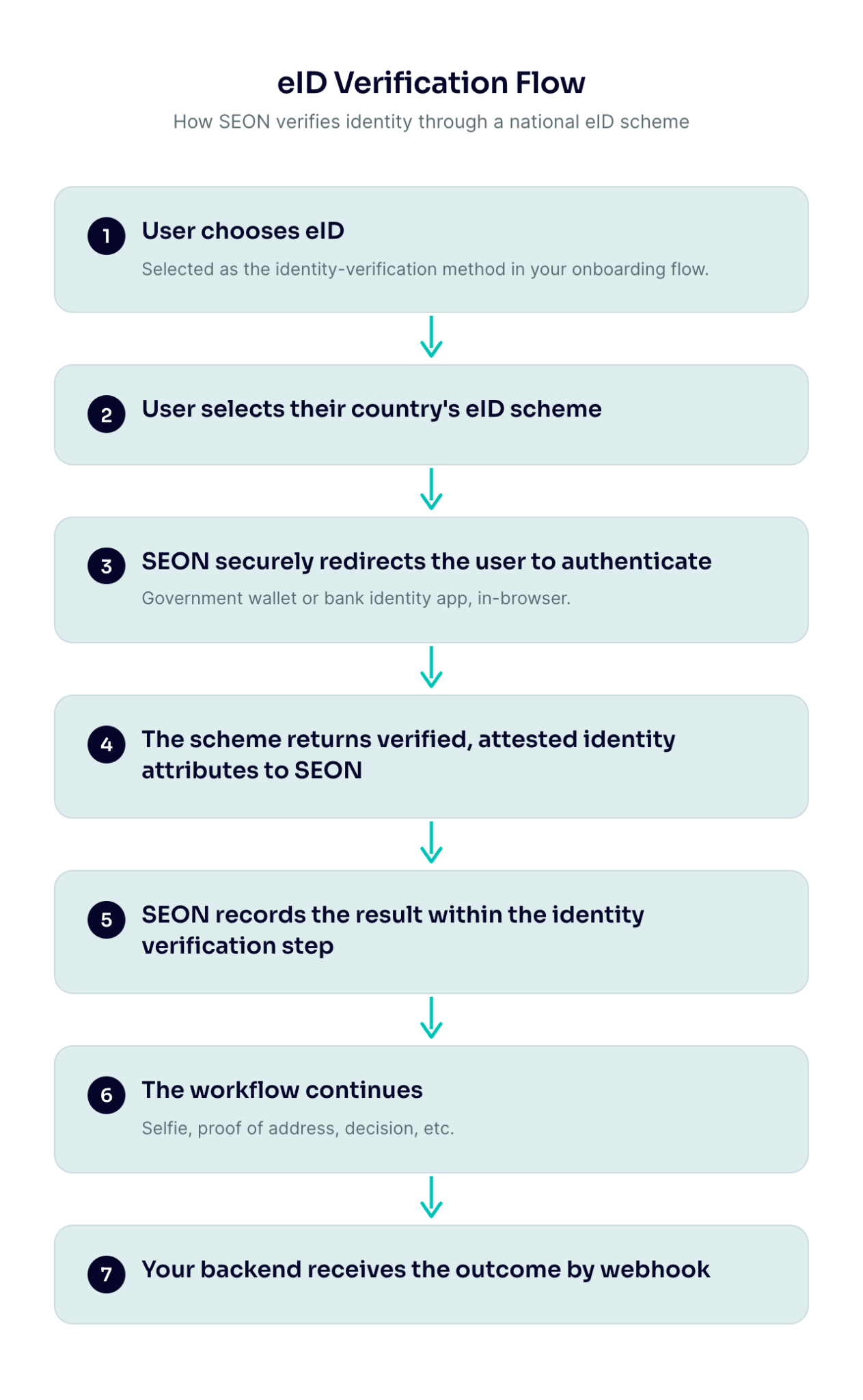
Because eID runs inside the same verification step as document capture, you can offer it as a fast path and keep document verification as an automatic fallback — so users who don't have an eID are never blocked.
How eID compares
eID isn't a replacement for document verification — it's a faster path for users who already have a government digital identity. For everyone else, document verification is always available. A single workflow can offer both, or route by country.
How to access eID and add it to a workflow
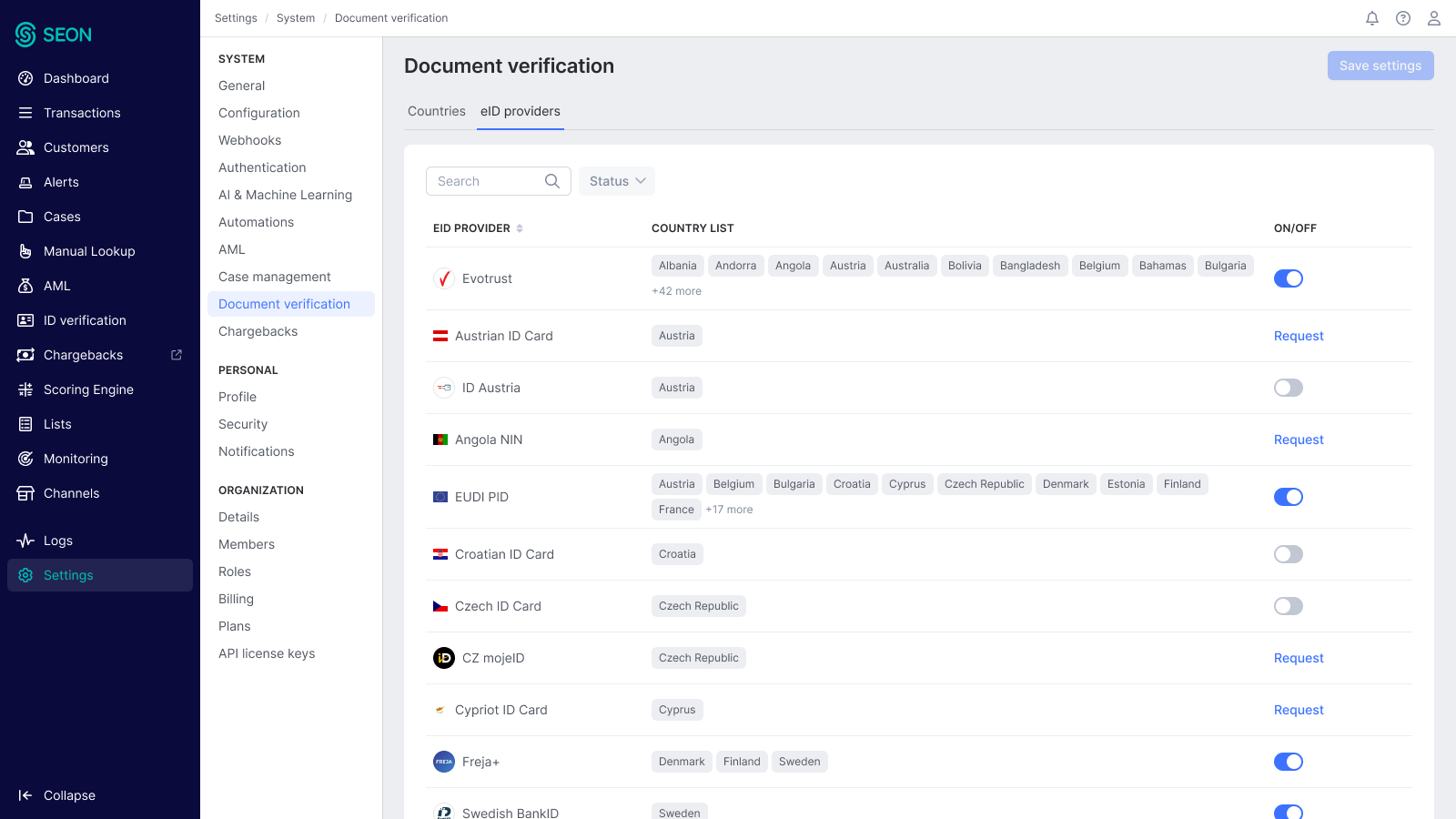
- Go to settings ? system ? document verification and then select the tab for eID providers.
- Toggle the switch on for the eID providers you require.

3. Once desired eID providers are enabled, go to the Workflow editor and open the Document Verification node.
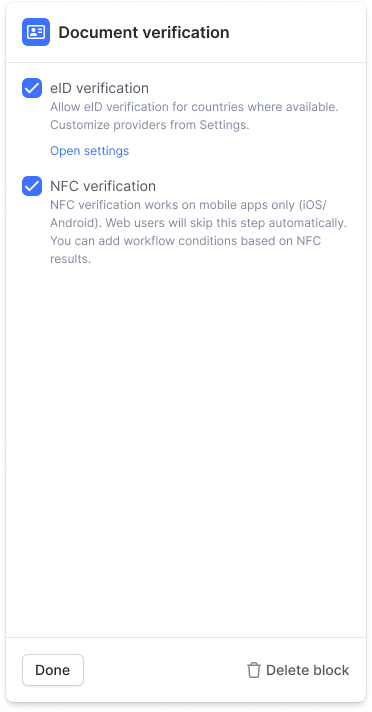
4. Enable eID and select which schemes to offer users in this workflow.
5. Optionally set eID as the preferred path with document verification as the automatic fallback.
6. Optionally add a condition to route users by country, for example, offering eID only in markets with high adoption and falling back to document verification everywhere else.

What SEON returns
Every eID scheme returns, at minimum:
- Full name
- Date of birth
Most schemes also return some of: nationality, gender, address, a national identifier and a portrait photo; the exact set depends on the scheme. These details are returned alongside the rest of the workflow's results.
You can also apply a configurable age check to an eID result toconfirm the user meets an age threshold (for example 18+) and return a simple pass, fail or review outcome, without your team having to calculate it.
Verification outcomes
eID results use the same verification outcomes as the rest of a workflow:
| Outcome | Meaning |
| Pending | The user has started but not yet completed authentication. |
| Approve | The user was authenticated and their identity was verified. |
| Review | The result needs manual review, for example, when data is incomplete. |
| Decline | Authentication failed or the user cancelled. |
| Abandoned | The user didn't complete verification in time. |
eID sessions appear in Workflow runs alongside your other verifications, with full drill-down into the result.
Supported countries and eID schemes
SEON supports 60+ government-backed digital identity schemes across 35+ countries spanning Europe, the Americas, Asia-Pacific, the Middle East and Africa. All schemes return at least full name and date of birth; most also return additional attributes (see What SEON returns above).
Availability depends on the scheme and your account setup (see Enabling eID above). Schemes marked (sandbox) are available in a test environment today so you can trial them before launch.
Europe
| Country | eID schemes |
| Austria | ID Austria |
| Belgium | Belgian eID card |
| Czech Republic | BankID, MojeID |
| Denmark | MitID |
| Estonia, Latvia | Mobile-ID |
| Estonia, Latvia, Lithuania | Smart-ID |
| European Union / EEA | EU Digital Identity wallet (sandbox), European ID card (sandbox) |
| Finland | Finnish Trust Network |
| France | L'Identité Numérique, FranceConnect (sandbox) |
| Germany | Personalausweis (national eID), Verimi |
| Iceland | Auðkenni |
| Italy | National eID card (CIE), SPID |
| Latvia | eParakSts |
| Netherlands | Digidentity, iDIN |
| Norway | BankID, Buypass, Vipps (sandbox) |
| Poland | eDO App, mObywatel |
| Portugal | Chave Móvel Digital |
| Sweden | BankID, Freja |
| Ukraine | Diia |
| United Kingdom | OneID, Yoti (sandbox) |
| Multiple countries (60+) | Evrotrust |
Americas
| Country | eID schemes |
| Brazil | CPF, Digital CNH |
| Chile | RUN |
| Mexico | CURP |
| Peru | DNI |
| United States | California mobile driver's licence, Samsung Wallet, U.S. digital passport, U.S. mobile driver's licence (sandbox) |
Asia-Pacific
| Country | eID schemes |
| India | DigiLocker, PAN, Aadhaar (sandbox) |
| Indonesia | National ID (NIK), National ID with biometric match |
| Singapore | Singpass (sandbox) |
| South Korea | PASS, iPIN, Mobile ID |
Middle East
| Country | eID schemes |
| Angola | National ID (NIN) |
| Côte d'Ivoire | National ID |
| Ghana | Ghana Card |
| Kenya | National ID, passport, alien card |
| Nigeria | NIN, BVN, voter ID |
| South Africa | National ID |
| Uganda | National ID (NIN) |
Global
| Coverage | eID schemes |
| Worldwide | International passport (sandbox) |
Some schemes verify identity by matching the user's details against an official database (for example in Brazil, India, Indonesia and Nigeria) rather than through an authentication step, which overlaps with SEON's eKYC checks. The distinction: with eID the user actively authenticates with their digital identity and the data is attested by the issuer; eKYC confirms details against a database without the user authenticating.
Use cases
- High-conversion onboarding in markets where digital identity is widely adopted (for example the Nordics, Baltics, and Benelux).
- A faster path alongside document capture with document verification as an automatic fallback.
- Age verification where a scheme returns age-related attributes.
- High-assurance onboarding for regulated services that need strong identity proofing.
Best practices
- Always keep a fallback. Offer eID with document verification as the fallback so users without an eID can still complete the flow.
- Route by country. Use a condition to offer eID only where adoption is high.
- Add a selfie where you need biometric assurance. eID confirms an authenticated identity; pair it with a selfie and liveness check when you also need to bind the person to the session.
SDK and API integration
eID runs through the same Workflow API and SEON SDKs you already use — there's no new SDK version and no separate integration. Enable it on the Document verification step of your workflow, and results are delivered by webhook alongside your other checks. See the Workflow API and How to integrate workflows.
Frequently asked questions
What happens if a user doesn't have an eID?
If you've configured document verification as the fallback, the flow moves to document capture automatically. The user doesn't see an error because eID is offered as a faster option and document verification is always available.
Do we need to change our integration to use eID?
No. eID uses the same Workflow API and SDKs you already use. It's enabled as an option on the Document verification step so no new API or SDK version is required.
How is eID different from document verification with NFC?
NFC reads the secure chip in a physical passport or ID card to confirm the document is genuine. eID verifies a person's digital identity by having them authenticate with their government or bank identity. They're complementary and can be combined.
Can we use eID just for age verification?
You can apply an age check to an eID result to confirm a user meets an age threshold (for example 18+) and receive a pass/fail/review outcome. The scheme still returns its standard identity attributes as part of the verification.
Which countries are supported?
See Supported countries and eID schemes above. SEON supports 60+ digital identity schemes across 35+ countries and the list keeps growing; availability for your account depends on the scheme and your setup, and some schemes are available in sandbox for testing ahead of production.