


Evidence Collection (Proof of Address, Source of Funds & more)

Updated on 01.10.26

4 minutes to read

Copy link
Overview
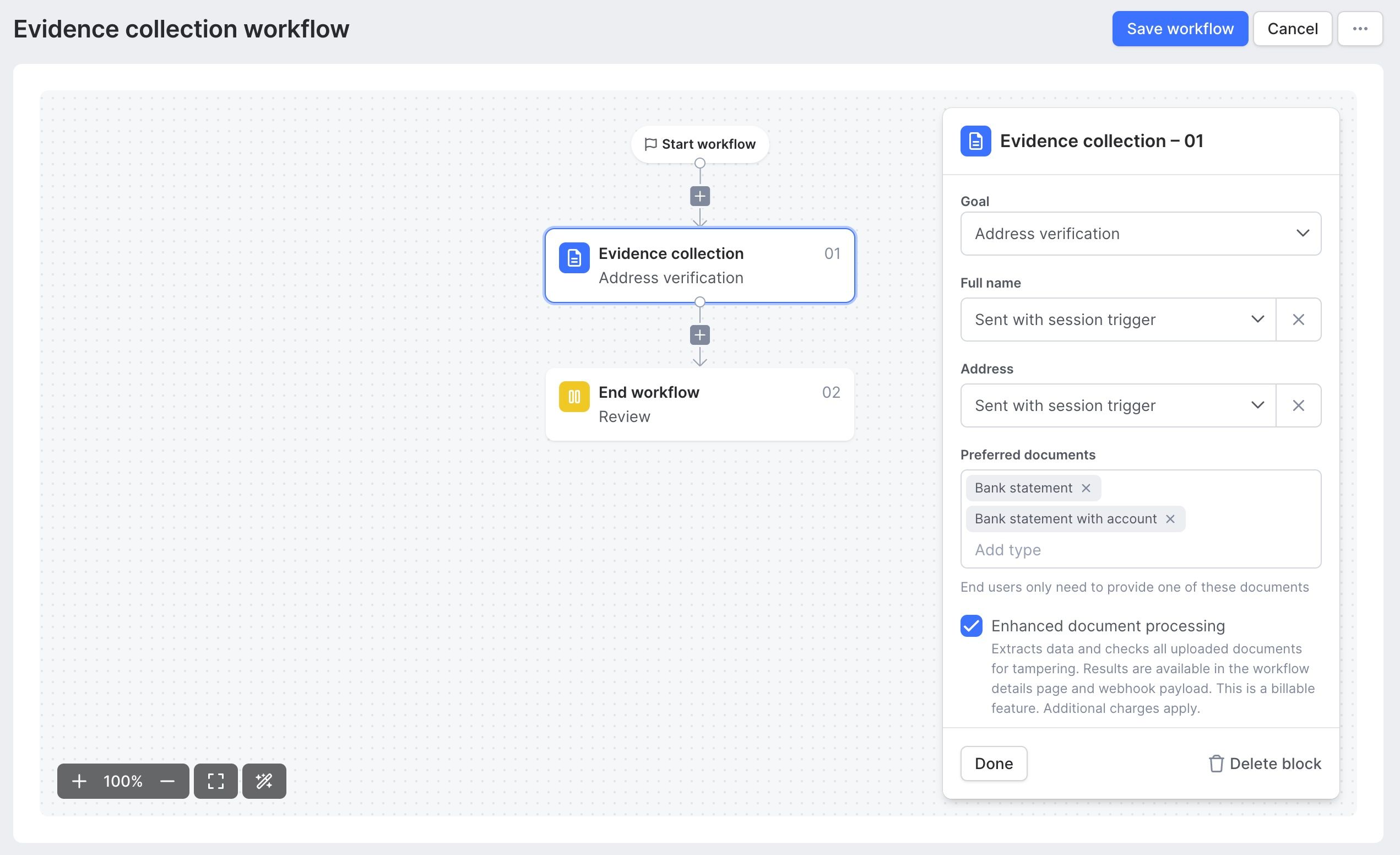
The Evidence Collection node is a single, general-purpose workflow node that collects a document from an applicant. It functions anywhere in a workflow without dependency on prior verification steps and can optionally run AI-powered extraction, cross-checking, and tamper detection.
For customers where it is enabled, this is the next iteration of the Proof of Address check. It replaces the standalone Proof of Address node with the same structured outcome and branching behavior, while offering more transparency into verification results and the ability to collect documents unrelated to addresses.
Two settings drive its behavior:
- Goal: Defines what the document is for. At launch, available goals are Proof of Address and Evidence Request (covering proof of ownership and custom document collection needs). This determines end-user copy, accepted-document guidance, and the verification comparison.
- Enhanced document processing: An optional, paid toggle. When off, the node collects and stores documents for human review. When on, SEON's document-verification engine runs extraction, content cross-checking, and tamper detection.

How it works
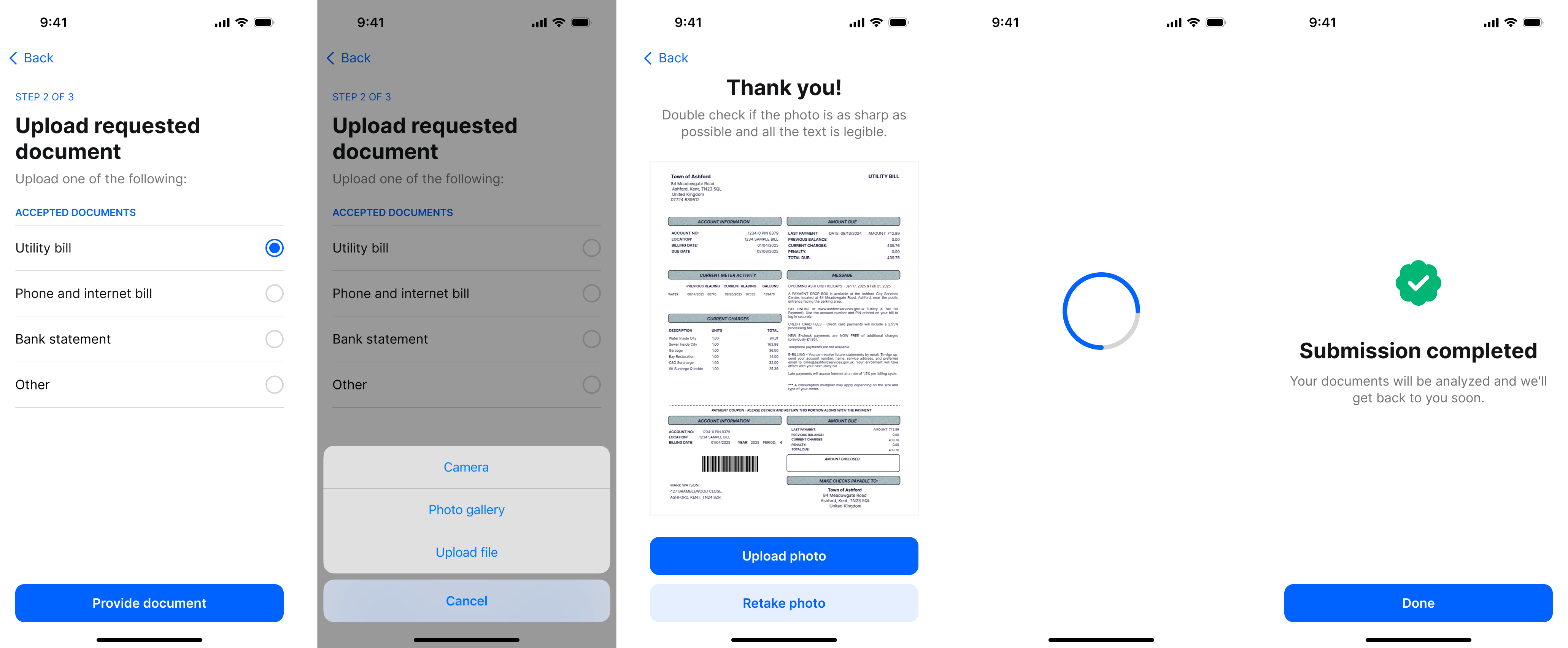
- Selection: The applicant selects their document type from your accepted list; upload is blocked until a type is chosen. If you've only configured one document type for this step, there's nothing to choose — the applicant lands straight on the upload screen, and the heading names the document directly (for example, "Upload bank statement").
- Capture/Upload: On mobile, users can use their camera or gallery; on web, they can drag-and-drop or browse. Capture method is recorded for audit.
- Preview: Captured photos allow for retakes; uploaded files can be reviewed or removed before final submission.
- Submit: The step completes and the workflow advances. The applicant does not see verification results.
Configuration
| Setting | Type | Default | What it controls |
| Goal | Select | Evidence Request | Defines the purpose. Determines end-user copy and verification logic. |
| Allowed document types | Multi-select | — | Guidance shown to the applicant. Note: This does not enforce or restrict uploads. |
| Enhanced document processing | Toggle | Off | Enables automated extraction, cross-checking, and tamper detection (additional cost). |
| Allow multiple files | Toggle | Off | Lets the applicant attach up to 5 files to one document request instead of 1. |
Important Implementation Notes:
- Type Enforcement: Selecting document types serves as guidance for the applicant; it does not validate or reject file types at the upload stage.
- Wording: Step wording is platform-managed and localized for full multi-language support.
- Skipping the document type selection: If you don't want applicants to choose a document type, select only one document type in the Preferred documents list in the node configuration. The applicant then goes straight to a single upload step, and the heading names the document directly (for example, "Upload bank statement"). If you list more than one type, the applicant sees the selection step first.
- Custom documents types: Defining custom document types is currently not supported. For type-agnostic flow select “Additional document” from Preferred documents to have a typeless end user experience. Useful when using Evidence Collection as a step-up flow, orchestrated by the customer.
Supported Documents and File Requirements
- Supported Types: SEON supports a localized list including utility bills, bank statements, mortgage statements, earning statements, passports, driving licenses, and IBAN ownership certificates.
- File Formats: JPG, JPEG, PNG, HEIC, and PDF.
- File Size: Maximum of 15 MB.
- Processing: Documents not matching structured types are processed generically; any recognizable fields are extracted.
Enhanced Document Processing
When enabled, SEON's engine performs the following analysis regardless of the chosen goal:
- Data Extraction: Available data points are extracted and returned via webhook and the dashboard.
- Content Cross-Check: Extracted data is compared against reference details available in the workflow (e.g., name, address, date of birth, document age).
- Tamper Detection: Authenticity checks identify digital alterations or editing, surfaced as an overall result plus specific findings.
Goal-Based Outcomes
| Goal | Processing OFF | Processing ON |
| Evidence Request | Document stored for manual review. (Outcome: REVIEW) | Full extraction, validation, and tamper detection. (Outcome: REVIEW) |
| Proof of Address | Document stored for manual review. (Outcome: REVIEW) | Full processing plus address validation. (Outcome: SUCCESS / REVIEW / FAILED) |
Verification Checks
- Document Authenticity: Scans for signs of digital alteration or editing.
- Content Validation: Compares extracted data against applicant reference details.
- Data Extraction & Logic: Uses OCR/AI to pull and consistency-check structured data.
Address Matching
For the Proof of Address goal, SEON compares the document address against the applicant's existing reference address (either passed at initialization or read from a previous identity document). If no reference address is available, the status is reported as NOT_PERFORMED.
Use cases
KYC/AML compliance: Fulfill regulatory requirements by verifying the residential address of new customers during onboarding.
Manual due diligence: Collect and store withdrawal reviews, source-of-funds documents, or any other supporting evidence an analyst needs to see, with or without automated analysis behind it.
High-risk account opening: Add a mandatory document check for users from high-risk jurisdictions or those flagged by the fraud engine.
Address change verification: Securely confirm a user's new address before updating their account details to prevent account takeover fraud.
Financial services onboarding: Meet stringent compliance standards for opening bank accounts, crypto wallets, gaming accounts, or other financial products.
Migration & Compatibility
If you're already using the standalone Proof of Address node, it continues to work unchanged and there's no forced migration — you're not required to move. When you do migrate, selecting the Proof of Address goal (with enhanced processing on) preserves your existing result contract, with the additional transparency and extraction data added on top rather than replacing anything. Historical sessions remain viewable in the dashboard whether or not you've migrated.

SDK integration
Evidence Collection is initiated and managed through SEON’s mobile and web SDKs. The SDKs provide the complete user interface for guiding users through the document capture process, ensuring high-quality images and a frictionless experience.
To start a verification, your application initializes the SEON SDK and configure it for a proof of address session. The SDK handles the camera interface, user guidance and secure submission of images to SEON’s servers.