


Digital Footprint: Email and Phone signals & categories

Updated on 07.10.26

10 minutes to read

Copy link
Overview
SEON checks whether an email address or phone number is registered on supported online platforms. Fraud, credit and risk teams use these signals to build rules, inform AI models and add context to individual investigations.
Coverage includes 350+ email and phone platform checks. There are two ways to receive this information: Standard mode returns aggregated category counts. Extended mode returns those same counts alongside individual platform results and additional profile fields where available.
How email and phone digital footprint signals work
A digital footprint check starts with a single identifier: an email address or phone number. Your application sends that identifier to SEON, for example when a customer creates an account or submits an application.
SEON checks supported online platforms for an account registered with that identifier. Each check can detect a registration, find no registration, or return no valid result.
Detected registrations are grouped by platform category, such as social media, entertainment or technology, and into personal and business totals. These classifications describe the services where registrations were found; they do not establish the identity or intent of the person using them.
Standard mode returns the category and group totals. Extended mode also returns individual platform results and additional profile fields where available. Adult-site results remain category-only in both modes.
Use the results alongside other risk signals. A detected registration does not verify a person’s identity, and a small or missing footprint does not by itself establish fraud. Platform availability and timeouts can affect the results.
Standard vs Extended mode
What you receive | Standard mode | Extended mode |
Category totals ( | Yes | Yes |
Individual signal results ( | No | Yes |
Additional profile fields | No | Where available |
Admin display | Category totals | Category totals and Registered profiles section |
Response time | Set by your timeout | Same as in Standard mode |
Typical uses | Rules and automated decisions | The same uses, plus platform-specific rules, model features and profile review |
How to get it | Included with Email API v3 and Phone API v2 | Contact your account manager or support@seon.io to upgrade |
Example: the same email address in both modes
In this example, SEON detects five registrations for one email address. Both modes report the same category totals. Extended mode also identifies the individual platforms.
Standard mode: category totals
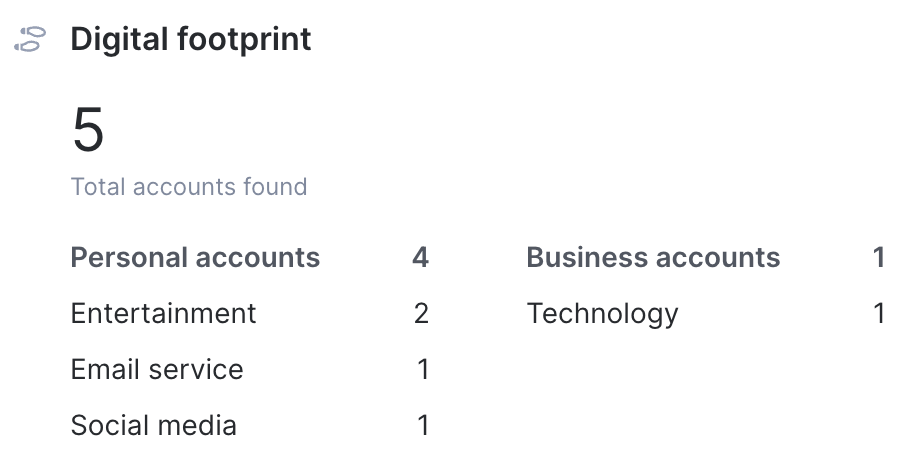
Group | Category | Registrations found |
Personal | Entertainment | 2 |
Personal | Email service | 1 |
Personal | Social media | 1 |
Business | Technology | 1 |
Total: 5 registrations, including 4 personal and 1 business.
Extended mode: category totals plus individual results
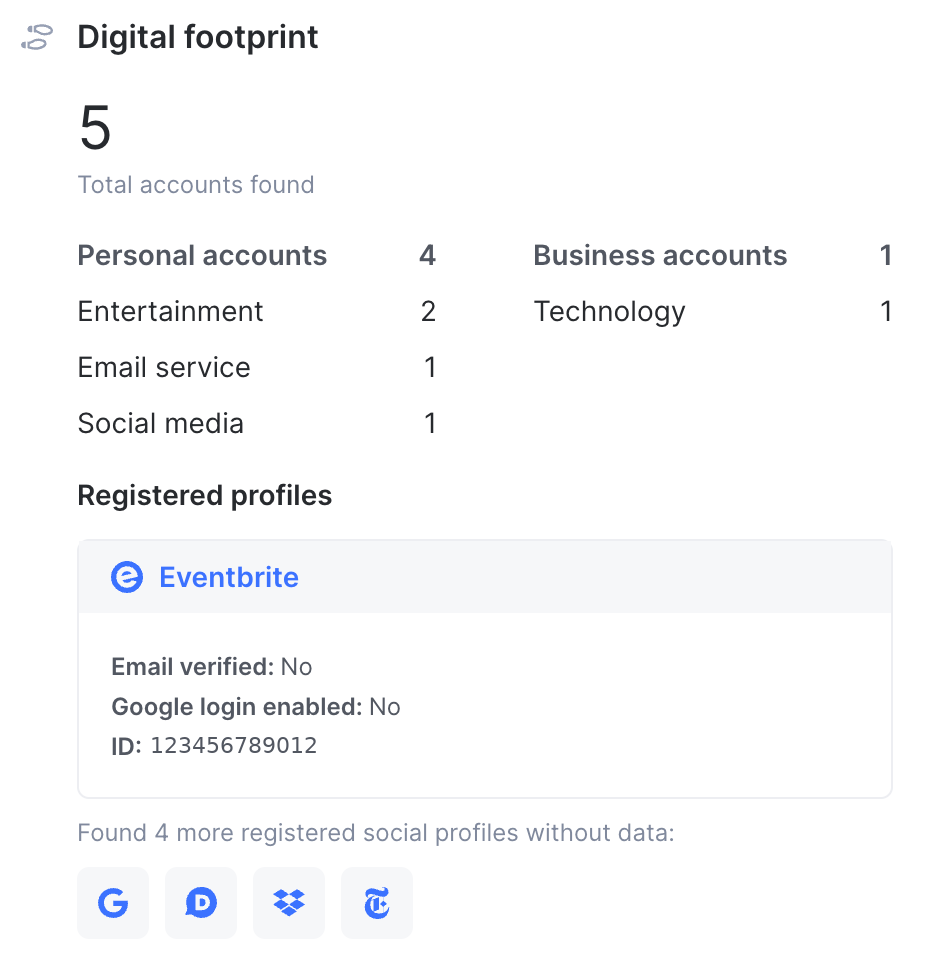
Platform | Registered |
Eventbrite | true |
The New York Times | true |
true | |
Discord | true |
Dropbox | true |
Extended mode includes the category totals above, as well as these individual platform results. Here, true means SEON detected a registration.
This simplified example shows detected registrations only. Extended-mode API results can also include false and null, as explained in “Read account_details” under the 'Extended mode: individual platform results' section below.
Standard mode: category totals
Standard mode returns account_aggregates in the API response. This object summarizes detected registrations by category and includes overall totals for the personal and business groups. It does not identify individual platforms. The same aggregate information is also available in Extended mode.
Use category totals in decisions
Use category totals when you need the number of detected registrations across a group of platforms, for example, in a rule evaluating social media registrations. New platforms automatically contribute to their category totals, reducing the need to maintain rules for individual platforms.
Changes in coverage or availability can change category counts. Monitor your thresholds as coverage changes, and consider the results alongside other risk signals, including the email and phone network scores.
Category totals in the Admin Widgets
On the Transaction details page, the Email information and Phone information widgets show category totals under Digital footprint. The table below maps the displayed totals to fields inside account_aggregates in the API response.
The field paths below include the account_aggregates object name:
In the widget | API field path |
Total accounts found |
|
Personal accounts |
|
Business accounts |
|
A category row, such as ‘Entertainment 2’ |
|
The widget displays categories with detected registrations. An absent category row does not confirm that every supported check returned a negative result. Review the API response and check availability when investigating gaps.
Find results in the API response
The response fragments in this guide omit the response envelope. The complete response places the objects at the paths below. account_details is returned with Extended mode enabled
Integration | Response path |
Standalone Email or Phone API | Category totals: |
Fraud API email results | Category totals: |
Fraud API phone results | Category totals: |
Read account_aggregates
Field | Type | Description |
| in | Total detected registrations across all categories |
| integer | Detected registrations across personal categories. |
| integer | Detected registrations across business categories. |
| integer | Number of platforms in this category with a detected registration. |
| integer | Number of platforms checked in this category. |
In the example, entertainment.registered is 2, meaning two platform checks detected a registration. entertainment.checked is 54, the number of checks recorded for that category. The category's catalog count describes supported coverage, rather than the results of this request.
Do not infer missing results solely by subtracting checked from the number of platforms in the catalog. Eligibility, configuration, availability and timeouts can affect the checks available for a request. A category object may be null when no registration is found; this is different from a platform-level registered value of null, which means no result was available.
Example category totals
This illustrative Email API v3 response fragment shows account_aggregates with four categories. It omits the response envelope and other fields. The five detected registrations match the example above.
{
  "account_aggregates": {
    "total_registration": 5,
    "personal": {
      "total_registration": 4,
      "email_service": {
        "registered": 1,
        "checked": 10
      },
      "entertainment": {
        "registered": 2,
        "checked": 54
      },
      "social_media": {
        "registered": 1,
        "checked": 27
      }
    },
    "business": {
      "total_registration": 1,
      "technology": {
        "registered": 1,
        "checked": 47
      }
    }
  }
}
Extended mode: individual platform results
Extended mode adds account_details alongside account_aggregates. Results appear under platform-specific keys, so you can identify detected registrations and distinguish negative results from unavailable results. Some platforms also return additional profile fields.
Use platform results in decisions
Use individual results when platform identity or profile data adds useful context. For example:
- Add registration results and available profile fields as features in your own machine learning models. Handle
nullas missing data and evaluate these features alongside other risk signals. - During a manual review, inspect registered platforms and compare available profile fields with the details the applicant submitted.
- Build a rule for a particular platform when a category total is too broad to express the condition you need.
Define how each rule or model handles missing data. A rule that depends on one platform can be affected by that check's availability. Evaluate platform results alongside category totals, network scores and other signals.
Registered profiles in the Admin Panel
In Extended mode, the Email information and Phone information widgets retain the category totals and add Registered profiles. This section shows detected registrations and any available profile fields.
Registered profiles shows detected accounts. Use the API response to inspect platform results that are false or null.
In the widget | In the API response |
A registered profile with details | A platform entry in |
An icon for a registered platform without profile data | A platform entry in |
Fraud API phone results | Category totals: |
For the wider email, phone and IP widget documentation, see Digital Footprint widgets.
Read account_details
Platform keys are case-sensitive. For example, Eventbrite appears as eventbrite and The New York Times as new_york_times. The field paths below are relative to account_details. Adult-site checks remain available as category totals only.
Field | Type | Description |
| boolean or |
|
| varies by platform | Additional profile data where available, such as GitHub |
Platform-level registered is a boolean or null; category-level registered is an integer count. A detected registration does not guarantee additional profile data. Fields differ by platform and may be unavailable even when registered is true.
For supported checks, see Checks with additional profile fields section.
Interpret platform registration results
Each platform check looks for an account registered with the submitted email address or phone number. In Extended mode, the platform-level registered field returns one of three values:
Value | Meaning |
| SEON found an account registered with the submitted email address or phone number. |
| SEON did not find an account registered with the submitted identifier on this platform. |
| No platform result was available. Treat this as unknown, rather than as |
A platform result can be null if a check fails or does not complete within the configured timeout. Treat this as unknown, rather than as a negative result.
Example individual platform results
This Extended-mode response fragment includes the same category totals as the Standard-mode example, plus individual platform results. It shows five detected registrations, one negative result and one unavailable result.
{
  "account_aggregates": {
    "total_registration": 5,
    "personal": {
      "total_registration": 4,
      "email_service": {
        "registered": 1,
        "checked": 10
      },
      "entertainment": {
        "registered": 2,
        "checked": 54
      },
      "social_media": {
        "registered": 1,
        "checked": 27
      }
    },
    "business": {
      "total_registration": 1,
      "technology": {
        "registered": 1,
        "checked": 47
      }
    }
  },
  "account_details": {
    "discord": {
      "registered": true
    },
    "dropbox": {
      "registered": true
    },
    "eventbrite": {
      "email_verified": "false",
      "google_login_enabled": "false",
      "id": "123456789012",
      "registered": true
    },
    "figma": {
      "registered": false
    },
    "google": {
      "registered": true
    },
    "new_york_times": {
      "registered": true
    },
    "spotify": {
      "registered": null
    }
  }
}
In this example, figma.registered is false: SEON did not find a Figma account registered with the submitted email address. spotify.registered is null: no result was available, so do not treat it as false. In the Eventbrite result, email_verified and google_login_enabled are booleans that include the value false; preserve the API’s field types when parsing results.
How to enable Extended mode
Both Standard and Extended modes are available with Email API v3 and Phone API v2, called directly or through the Fraud API. Extended mode is enabled at the account level. Contact your account manager or support@seon.io to confirm availability and arrange access.
If your integration already uses Email API v3 or Phone API v2, Extended mode does not require an additional mode parameter in the request. Enablement is an account-level setting, separate from the configuration shown below.
If you use an older API version, first review Migrate from Email API v2 or Phone API v1.
- Use Email API v3 or Phone API v2. If you use the Fraud API, configure the module versions as shown below.
- Arrange Extended mode access in your sandbox environment with your account manager or support.
- Send a test request and confirm that
account_detailsis present alongsideaccount_aggregates. - Verify that your integration handles null values and additional platform keys, then confirm production enablement with your account manager.
Example Fraud API configuration:
{
  "config": {
    "email_api": true,
    "phone_api": true,
    "email": {
      "version": "v3",
      "timeout": 5000
    },
    "phone": {
      "version": "v2",
      "timeout": 5000
    }
  }
}
Coverage, timeouts and availability
How to adjust timeouts
The results available for a request depend on the identifier, supported checks, account configuration, platform availability and timeout settings. A longer Email or Phone API timeout can improve coverage, but may increase the time spent collecting results. A timeout of 4,000 to 5,000 ms is recommended for better coverage; choose a setting that fits your workflow.
Your client-side integration timeout also includes network latency and SEON processing. Allow sufficient time for the configured enrichment timeout. Some checks require a minimum timeout or support only certain identifiers. See How to adjust Digital Footprint timeout for configuration guidance.
How to check platform availability
Use the SEON enrichment status page to review operational updates and published restrictions, such as supported email domains, country codes or minimum timeouts.
A platform incident can affect the results returned for that check. A null result can also have other causes, so use the status page alongside your request configuration and the coverage information below.
Migrate from Email API v2 or Phone API v1

The newer versions return category totals in Standard mode. With Extended mode enabled, they also return individual platform results and additional profile fields where available.
Available checks, platform keys and profile fields differ from the older versions. Review the fields used by your integration, rules and models before upgrading.
The tables below summarize platform-level changes. They do not cover every request or response change. Use the Email API v2 to v3 and Phone API v1 to v2 migration guide to plan the complete upgrade, including changes to request methods and other response fields.
Removed platform checks
The checks listed below are removed from the newer versions. Adult site checks are handled separately: their results are returned under account_aggregates.personal.adult_sites, rather than as individual entries in account_details in the API response.
API | Removed checks |
Email API | Airbnb, eBay, Foursquare, JD, Kakao, Nike, SoundCloud, Taringa |
Phone API | JD, Kakao, Snapchat, Viber, Yahoo |
Renamed platform key and fields
Update integrations that reference these renamed keys or fields. Paths in this table are relative to account_details.
API | Old key | New key |
Email API |
|
|
Email API |
|
|
Phone API |
|
|
Phone API |
|
|
Removed profile fields
These platforms remain in the catalog, but the listed profile fields have been removed in newer versions.
API | Old key | New key |
Email API | Duolingo |
|
Email API |
| |
Email API | Flickr |
|
Email API | GitHub |
|
Email API |
| |
Email API | Gravatar |
|
Email API |
| |
API |
| |
Phone API |
| |
Phone API | Zalo |
|
FAQs and troubleshooting
Are category totals the same as network scores?
No. Category totals count detected registrations. Email and phone network scores combine registration-related features with other data to estimate fraud risk. See Email and phone network scores for the scoring explanation.
Why is account_details missing from the API response?
Check that your request uses Email API v3 or Phone API v2 and that Extended mode is enabled for the account and environment receiving the request. In the Fraud API response, look inside email_details or phone_details under data. Contact support if you still cannot locate the object.
Why does a platform return null?
No platform result was available. Check the service status, applicable coverage restrictions and request timeout. A longer or priority timeout may help with slow checks, but will not resolve every unavailable result. Do not interpret null as false.
Why is a profile field empty when registered is true?
The check detected a registration, but the additional field may not be available. Platforms return different fields, and some return only registered. Build your integration to handle unavailable profile data.
How should models handle changes in coverage?
Support additional platform keys without treating them as errors. Before changing API versions, review removed checks, renamed keys and removed profile fields. Revalidate models and rules that depend on those inputs, and remap or retrain affected features where needed.
Supported platforms and categories
Supported email platforms
The catalog below lists 293 email checks across 18 categories. Category keys are paths inside account_aggregates. These counts describe catalog coverage, rather than registrations or checks in an individual response. Available results depend on the conditions described above.
Category | Category key | Count | Platforms |
Adult sites |
| 9 | Returned as a category total only. Individual results are not returned. Platforms: F95Zone, Loverslab, Motherless, Pornhub, RedTube, Tukif, XVideos, XNXX, YouPorn |
AI platforms |
| 9 | ChatPDF, DeepSeek, Liner, Lovable, Mistral, OpenRouter, Qwen, SeaArt, Windsurf |
Betting and gaming |
| 17 | Bet-at-home, Betano, Betcris, Betfair, Betnacional, Caliente, Ladbrokes, Neds, Rushbet, Sky Bet, Sports Interaction, Strendus, Superbet, TAB, Tipico, VoodooDreams, Winpot |
Dating |
| 11 | Ashley Madison, CatholicMatch, DilMil, Jeevansathi, LovePlanet, Match, OkCupid, PlentyOfFish, Shaadi, Skout, Stir |
Delivery |
| 8 | bTaskee, Deliveroo, DoorDash, GetJusto, Glovo, Instacart, Rappi, Zomato |
E-commerce |
| 25 | AliExpress, Amazon, BeatStars, Bukalapak, Buy Me a Coffee, Coppel, Daraz, DHgate, Displate, El Palacio de Hierro, eMAG, Flipkart, H-E-B, Ikman, IndiaMART, Lazada, Lidl, Momo, Nykaa, Patreon, ShopClues, Snapdeal, Tiki, Tokopedia, Trendyol |
Email service |
| 10 | AOL, Apple, GMX, Google, Mail, Mail.ru, ProtonMail, Web.de, Yahoo, Yandex |
Entertainment |
| 59 | ABC, AlloCine, ALTBalaji, Anghami, Bitmoji, Business Insider, Chess, CNN, Curiosity, Dailymotion, DAZN, Deezer, DeviantArt, Disney+, EA, The Economist, ESPN, Eventbrite, Express, Flickr, Forbes, franceinfo, Gaana, GIPHY, Goodreads, Hulu, Imgur, The Indian Express, Indiatimes, Jeuxvideo, JustWatch, Last.fm, Lichess, Medal, Medium, MyAnimeList, Netflix, New York Post, The New York Times, Nexon, NRK, PlayPark, Plex, Rambler, Rumble, SimpCity, Smule, Sporcle, Spotify, Starz, STARZPLAY, TF1, Tistory, Tunefind, Untappd, Vimeo, Vivino, Wattpad, ZEE5 |
Health and fitness |
| 7 | Bodybuilding, Bupa, Fitbit, Komoot, MyFitnessPal, Runtastic, Strava |
Messenger |
| 1 | GroupMe |
Real estate |
| 8 | Bayut, Cian, Housing, OnTheMarket, PropertyFinder, Realtor, Redfin, Rightmove |
Social media |
| 27 | Babelio, CaringBridge, Change.org, ChatLib, Discord, Disqus, Facebook, Instagram, Meetup, Meta, MySpace, Nextdoor, OK.ru, Parler, Pinterest, Plurk, QQ, Quora, Qzone, Snapchat, Tagged, TikTok, Tumblr, Twitter, VKontakte, VSCO, Weibo |
Technology (personal) |
| 8 | About.me, Any.do, Bitly, Google Calendar, ImageShack, LastPass, Microsoft, Tweakers |
Travel |
| 14 | Booking, Busbud, FlightAware, IRCTC, Kayak, OYO Rooms, Polarsteps, RailYatri, Ryanair, Skyscanner, Travellerspoint, Trivago, UAE ICP, Zoomcar |
Jobs and employment |
| 10 | Computrabajo, Fiverr, Freelancer, Glassdoor, Indeed, LinkedIn, Naukri, RocketReach, Talent, Xing |
Money transfer and remittance |
| 9 | Binance, Cash App, CoinMarketCap, KuCoin, OFX, PayPal, Paytm, PhonePe, Venmo |
Science and education |
| 14 | Academia, Archive, Babbel, CNKI, Duolingo, edX, IEEE, Kahoot, Khan Academy, MDPI, Meritnation, Merriam-Webster, NASA, Unacademy |
Technology (business) |
| 47 | Adobe, Ars Technica, Asana, Asus, Atlassian, Autodesk, Basecamp, Calendly, Codecademy, CodeIgniter, Diigo, Docker, Dropbox, Envato, Evernote, Expensify, Figma, Firefox, GitHub, Grammarly, Gravatar, HubSpot, Insightly, Intercom, Kommo, Mailchimp, Microsoft Teams, Miro, Monday, Nimble, Notion, NVIDIA, Office 365, PicsArt, Pimeyes, ProxiesIO, QuillBot, Replit, Samsung, SEOClerks, Streamlabs, SurveyMonkey, Treehouse, Vistaprint, Wix, WordPress, Zoho |
Supported phone platforms
The catalog below lists 61 email checks across 14 categories in the same coverage snapshot. As with email checks, the category key is a path inside account_aggregates. Available results depend on the submitted number and the applicable coverage conditions.
Category | Category key | Count | Platforms |
Betting and gaming |
| 4 | Betway, SportyBet, Strendus, Winpot |
Dating |
| 2 | Jeevansathi, Shaadi |
Delivery |
| 5 | Careem, DiDi, DoorDash, Gojek, Swiggy |
E-commerce |
| 12 | AliExpress, Bukalapak, Flipkart, IndiaMART, Lazada, Lidl, MiTelcel, ShopClues, Snapdeal, Soriana, Tiki, Tokopedia |
Email service |
| 1 | |
Entertainment |
| 5 | ALTBalaji, Costarastrology, The Indian Express, PlayPark, ZEE5 |
Messenger |
| 5 | GroupMe, Line, Telegram, WhatsApp, Zalo |
Real estate |
| 1 | Housing |
Social media |
| 12 | Facebook, Foursquare, Instagram, MeWe, Nextdoor, OK.ru, Parler, QQ, Twitter, VKontakte, Weibo, Zepeto |
Technology (personal) |
| 1 | Microsoft |
Travel |
| 3 | IRCTC, OYO Rooms, Redbus |
Money transfer and remittance |
| 5 | Binance, Cash App, GCash, PhonePe, Venmo |
Science and education |
| 1 | Unacademy |
Technology (business) |
| 4 | Expensify, Microsoft Teams, Office 365, Zoho |
Checks with additional profile fields
In Extended mode, the 22 email checks and 9 phone checks listed below can return profile fields in addition to registered. Available fields differ by platform, and some may be unavailable even when a registration is detected.
API | Removed checks |
Email API | BeatStars, Cash App, Computrabajo, Duolingo, Eventbrite, Expensify, Flickr, GitHub, Google, Google Calendar, Gravatar, H-E-B, ImageShack, IndiaMART, Lidl, Medium, Microsoft Teams, Nykaa, OK.ru, PayPal, ProtonMail, Smule |
Phone API | Cash App, Expensify, IndiaMART, Lidl, Line, Microsoft Teams, OK.ru, Telegram, WhatsApp |