


Credit card verification

Updated on 30.04.26

4 minutes to read

Copy link
Overview
Credit card verification uses AI-powered, on-device card scanning to confirm that the person completing verification physically possesses the card they are registering, whether it is a credit, debit or prepaid card issued by major global card networks, and that the name on the card matches their verified identity.
Unlike card-not-present checks that rely solely on manually entered details, this process requires the user to present a real, physical card in front of the camera, making fraud involving stolen card numbers or synthetic identities significantly harder to carry out.
This check is designed to prevent payment fraud and source-of-funds abuse at the point of onboarding. By combining real-time card liveness detection with SEON's 900+ unique fraud signals, spanning device intelligence, digital footprint, behavioral biometrics and IP reputation, SEON can quickly determine not only whether the user holds a genuine physical card, but also whether the cardholder is who they claim to be.
How credit card verification works
Credit card verification is user friendly and guides the user through capturing their card and delivers a result in seconds.
- Guided card capture: The user is prompted to capture the front and back of their payment card. The SDK provides a real-time camera interface with positioning, lighting and angle guidance to ensure a clean scan.
- On-device processing: OCR, liveness detection, card number validation (Luhn check), and data anonymization all run locally on the user's device. The full PAN is anonymized to BIN (first 6 digits) + last 4, and CVV is permanently deleted — neither is ever transmitted to SEON's backend.
- User intent analysis: Liveness checks verify that the user is presenting a physical card rather than a screen image, photocopy, or a card lying flat on a surface.
- Unified verification results: An Approved/Review/Failed outcome is returned in real time via webhook and the SEON platform, along with liveness flags, a cardholder name match result, and anonymized card metadata.
Platform behavior
On mobile devices (iOS and Android), the SDK opens the card scanning interface directly. On desktop (web), the behavior depends on your mobile enforcement setting:
- Mobile enforcement ON: The SDK displays a QR code. The user scans the QR code with their phone and completes the card capture on their mobile device.
- Mobile enforcement OFF: The SDK opens the web camera for card capture directly in the browser.
Privacy and PCI compliance
All card scanning, OCR and liveness detection run entirely on the user's device using SEON’s SDK. Full card numbers (PAN) and CVV are processed in-memory and anonymized before transmission — they never reach SEON's infrastructure. This design keeps your SEON integration outside the cardholder data environment (CDE), maintaining PCI DSS SAQ A compliance.
How to turn on credit card verification
You can add credit card verification to any identity verification journey using the Workflow editor.
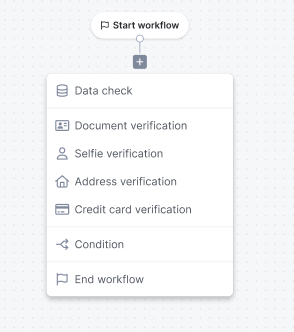
- Navigate to Workflows and open an existing workflow or create a new one.
- Add the Credit Card Verification node to your workflow path.
- Configure your branching logic based on the outcomes (Approved, Review, Declined) or specific sub-checks.
- Save and publish your workflow.

Verification checks
SEON performs a comprehensive, on-device AI analysis to ensure the physical presence and authenticity of every submitted card.
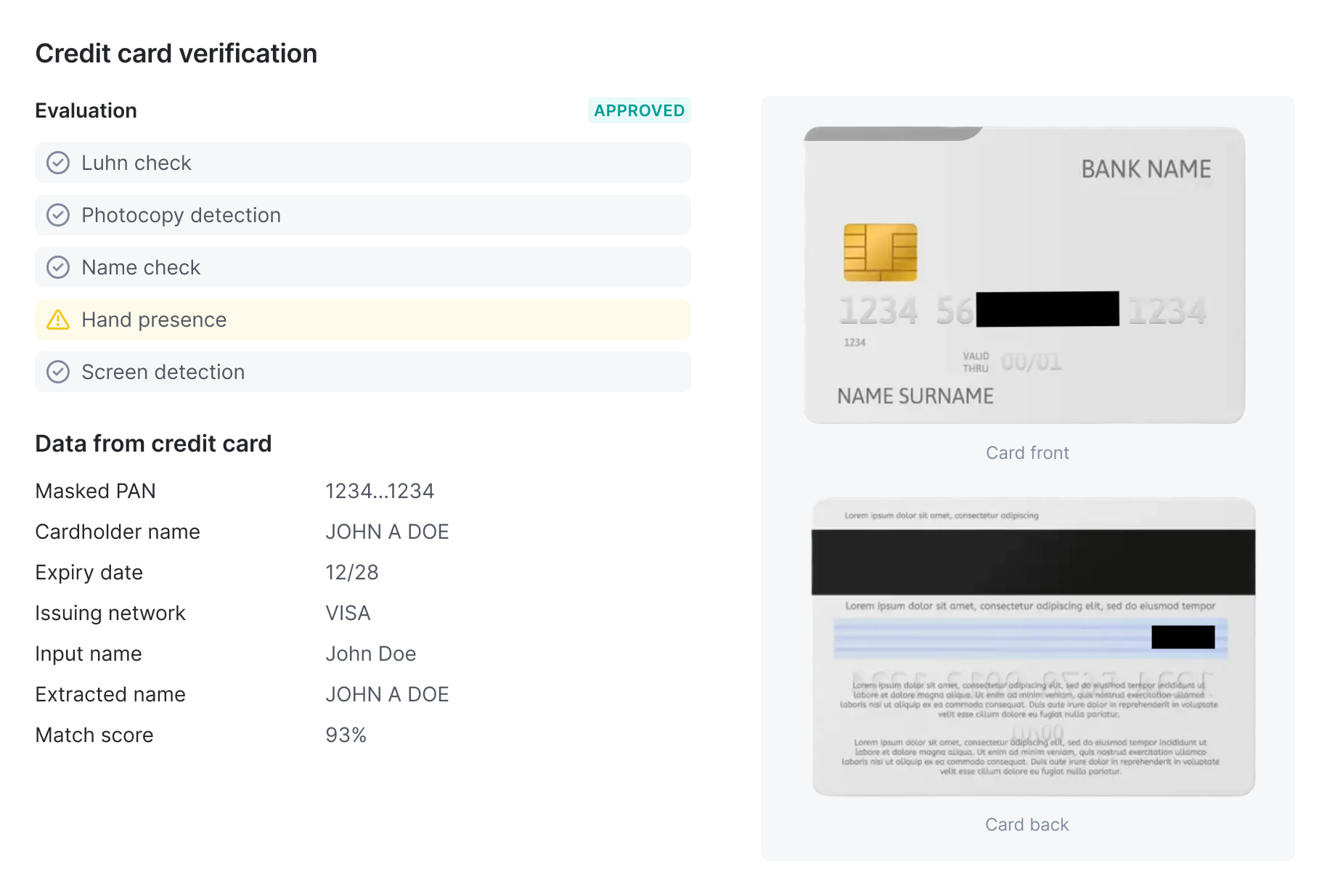
| Check | What it validates |
| Screen detection | Identifies cards displayed on a phone or computer screen rather than a physical card |
| Photocopy detection | Detects printed or photocopied card images |
| Hand presence | Confirms a human hand is physically holding the card during capture |
| Card number validity | Validates the card number using the Luhn algorithm |
| Name verification | Fuzzy-matches the cardholder name on the card against the name provided or extracted from a prior document check |
| Expiry date | Confirms the card is not expired |
| Data integrity | Validates that all required card fields are present and structurally consistent |
Data extracted
Credit card verification captures and transmits only anonymized card data. The following fields are extracted on-device and returned in the verification result:
| Field | Notes |
| Card number (masked) | BIN (first 6 digits) + last 4 digits only. Full PAN is never transmitted. |
| Cardholder name | As printed on the card |
| Expiry date | Month and year |
| IBAN | Where present on the card |
| Issuing network | Visa, Mastercard, Amex, etc. |
| Liveness flags | Per-side results for screen detection, photocopy detection, and hand presence |
| Name verification result | Match confidence score between cardholder name and reference identity |

Cardholder name verification
When credit card verification is used alongside a document verification check in the same workflow, SEON automatically cross-references the cardholder name extracted from the card against the name extracted from the identity document. The match produces a confidence score used for workflow branching, enabling you to automatically flag or reject sessions where the card and document belong to different people.
Name comparison uses fuzzy matching to account for abbreviations, middle name omissions, and formatting differences across card issuers and countries.
SEON returns one of the following match statuses:
| Status | Confidence | Meaning | Example |
| MATCH | ? 0.90 | Names are equivalent (exact or trivial variation) | "John Smith" vs "JOHN SMITH", or "Smith John" vs "John Smith" |
| PARTIAL_MATCH | 0.60 to 0.89 | Likely the same person (abbreviation, OCR error, or known alias) | "Johnathan Smith" vs "JOHN SMITH", or "José García" vs "JOSE GARCIA" |
| MISMATCH | < 0.60 | Names are completely different | "John Smith" vs "MARIA GARCIA" |
| NOT_PERFORMED | n/a | No input name was provided or extraction failed |
Outcomes and branching
The credit card verification check shows an overall status of APPROVED, REVIEW or DECLINED. All card verification results are available as condition variables in downstream nodes of workflows.
You can route flows based on:
- Overall card outcome
- Liveness checks (screen, photocopy, hand)
- Name match confidence
- Issuing network
- Card validity (Luhn check)
Use cases
- Deposit verification: Confirm that the card used for deposits is physically held by the account holder at onboarding, reducing chargebacks from stolen card details.
- Financial services onboarding: Meet source-of-funds verification requirements (UK Gambling Commission, MGA, and similar regulators) as part of a KYC/AML-compliant onboarding flow.
- Fraud-resistant account creation: Prevent Card-Not-Present (CNP) fraud at signup by requiring physical card presence, not just card details.
- Cross-verification: Automatically verify that the name on a payment card matches the name on a government-issued ID within a single workflow — no manual review or external tooling needed.
SDK integration
Credit card verification is initiated and managed through SEON's mobile and web SDKs. The SDKs provide the complete user interface for guiding users through card capture, and handle all on-device processing — including OCR, liveness detection, and data anonymization — so that full card numbers and CVV values never leave the user's device.
To start a verification, your application will initialize the SEON SDK and configure it for a credit card verification session. The SDK handles the camera interface, user guidance, on-device anonymization, and secure submission of results to SEON's servers.
